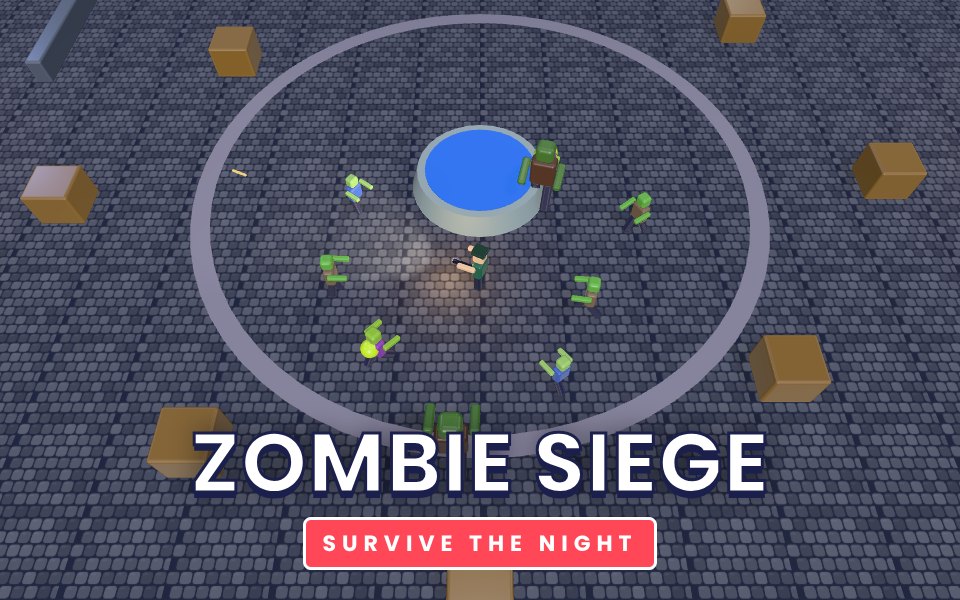
Zombie Siege is a top-down survival shooter set in a lamp-lit town square at night. The undead pour in from every side, wave after wave, and each wave is bigger and faster than the last. Shamblers walk straight at you, runners close the gap in seconds, hulking brutes soak up whole magazines and spitters keep their distance and lob acid. Your pistol never runs out, but the SMG, shotgun and armour-piercing rifle dropped around the square are what keep you alive. Crates, barricades and the fountain give you cover and choke points. Clear a wave and choose one of three upgrades: more damage, faster fire, quicker boots, extra health, piercing rounds, more ammo or slow healing. There is no final wave: see how long you can last.
How to play
Move with WASD and aim with the mouse. Hold the left mouse button to fire. Press Q to switch back to the pistol.
On a phone, move with the stick on the left. Your hero aims at the nearest zombie and fires automatically.
Walk over weapon cases to pick up the SMG, shotgun or rifle, and over medkits to heal.
After each wave pick one of three upgrades.
Tips
Keep moving. Standing still lets the horde surround you.
Use the crates and barricades to funnel zombies into a line, then use the rifle to hit several at once.
Deal with spitters quickly: their acid hurts and they hide behind the crowd.
Save the shotgun for brutes and close calls.
Piercing and damage upgrades scale best into the late waves.
The complete Zombie Siege guide
This is the complete guide to Zombie Siege on Xons Play: what the game is, how the controls work, a visual walkthrough with real screenshots, strategy from beginner to advanced, the mistakes most players make and how to avoid them. Read it from top to bottom before your first game, or jump to the section you need.
At a glance
Players1 player
GenreAction
Difficulty Easy to learn
Typical session5 to 20 minutes per run
Key skillsMovement, target priority
GoalBeat your best score
Works onPhone, tablet, PC
PriceFree, no download
Visual guide to Zombie Siege
How a game works, step by step
1
Move with WASD and aim with the mouse. Hold the left mouse button to fire. Press Q to switch back to the pistol.
2
On a phone, move with the stick on the left. Your hero aims at the nearest zombie and fires automatically.
3
Walk over weapon cases to pick up the SMG, shotgun or rifle, and over medkits to heal.
4
After each wave pick one of three upgrades.
Controls diagram
Touch screen
Left stickMove on phones; firing is automatic
Mouse
Mouse, hold left buttonAim and fire
Keyboard
WASDMove
QBack to the pistol
Controls for Zombie Siege on phones, tablets and computers.
Why people love Zombie Siege
Action games make your heart beat faster. Zombie Siege throws something new at you every few seconds, and getting through a tough moment feels genuinely exciting. Failing is quick and restarting is instant, so the game keeps you in the flow. Over time you notice yourself reacting faster and reading situations earlier, which is a satisfying kind of progress that you can feel in your hands.
The objective
Survive as many waves as you can. Your score counts every zombie and every wave cleared.
Background: where Zombie Siege comes from
Zombie Siege is a test of positioning more than aim. The square has cover, choke points and pickups, and the waves get bigger every time. This guide explains the zombie types, the weapons and the upgrades that matter most.
Controls explained
Device
Input
What it does
Keyboard
WASD
Move
Mouse
Mouse, hold left button
Aim and fire
Keyboard
Q
Back to the pistol
Touch
Left stick
Move on phones; firing is automatic
The controls are the same on every level and in every mode, so once they feel natural you can focus fully on the game. Keyboard players get the most precise control, while touch players get large, thumb-friendly buttons.
Your first game of Zombie Siege
Press the Play button under the game title. Zombie Siege loads in a few seconds and starts in full screen on phones.
Step 1. Move with WASD and aim with the mouse. Hold the left mouse button to fire. Press Q to switch back to the pistol. Take your time on the first attempt and get a feel for how the game responds.
Step 2. On a phone, move with the stick on the left. Your hero aims at the nearest zombie and fires automatically.
Step 3. Walk over weapon cases to pick up the SMG, shotgun or rifle, and over medkits to heal.
Step 4. After each wave pick one of three upgrades. That is the whole loop. Every game of Zombie Siege follows this pattern, with new situations each time.
On a keyboard you can use WASD to move, Q to back to the pistol. Remember the objective: Survive as many waves as you can. Once that is clear, every decision becomes easier, because you can ask whether a move brings you closer to it.
Zombie Siege strategy
Circle the fountain
The fountain blocks zombies but not bullets. Walking around it keeps the horde in a line behind you.
Kill spitters first
Spitters keep their distance and lob acid. Turn and deal with them before they whittle down your health.
Match the weapon to the wave
The SMG shreds runners, the shotgun stops brutes at close range, and the rifle pierces through a line of walkers.
Choose upgrades that scale
Damage and piercing grow more valuable every wave. Health upgrades also heal you to full, which is a lifesaver after a bad wave.
A closer look at Zombie Siege
On touch screens your hero aims at the nearest zombie and fires automatically, so you can concentrate on movement.
Common mistakes and how to fix them
Standing still
Zombies come from all four sides. Standing in one place lets them surround you.
Wasting rifle ammo
Save the rifle for lines of zombies so every bullet hits more than one.
Forgetting medkits
Medkits disappear after a while. Grab them between waves.
Levels, difficulty and progression
Every wave adds more zombies and makes each one a little tougher. Brutes join from wave five, and every fifth wave adds extra brutes. We rate Zombie Siege as easy to learn (2 out of 5), with a typical session of 5 to 20 minutes per run.
What Zombie Siege trains
Zombie Siege is an action game that rewards movement, target priority. Things happen quickly, and the best players stay calm while reacting. Each attempt of 5 to 20 minutes per run teaches you more about the patterns and timing the game uses, so failing is part of learning. Action games have been shown in studies to improve attention and the ability to track several moving objects at once, and they are simply exciting to play.
How to practise and improve
Practise Zombie Siege in short bursts. Focus on one section that keeps beating you and try it until it feels easy. Use small inputs, look ahead and keep calm. Your progress is saved on your device, so you can always come back later with fresh reflexes.
Playing on phone, tablet and computer
Zombie Siege runs directly in your web browser on phones, tablets, laptops and desktop computers. There is nothing to install and no account needed. On a phone, the game adapts its controls to touch, with large buttons and swipe gestures sized for thumbs. On a computer, you can use the mouse and keyboard, which many players find more precise. Tablets give you the best of both: a big screen with touch controls. For the smoothest experience, close other heavy tabs, keep your browser up to date, and use the fullscreen button in the game bar. If you play on a phone with a small screen, turning it sideways usually gives you a wider view. The game saves your progress and best scores in your browser, so playing on the same device keeps your records.
Playing alone and sharing scores
Zombie Siege is a single-player game, which means you can play at your own pace whenever you like. Your best score and progress are saved on your device, so every session builds on the last. It also makes a fun challenge to share: play a round, tell your friends your score, and see who can beat it. Many families pass a tablet around and take turns, which turns a solo game into a group activity.
Goals for every level of player
Beginner
Learn the controls and the objective, and finish a full game of Zombie Siege without rushing. Keep moving. Standing still lets the horde surround you. Do not worry about winning yet; focus on understanding why things happen.
Intermediate
Start using the first two strategy ideas on this page: circle the fountain and kill spitters first. Try to avoid the common mistakes listed above, and notice when you make them.
Advanced
Combine every idea: match the weapon to the wave and choose upgrades that scale. Chase a personal best you thought was out of reach, and think a step further ahead than your opponent.
Accessibility and comfort settings
Zombie Siege is designed to be comfortable for as many people as possible. Every button is large enough for touch, text uses high-contrast colours on a dark background, and important information is shown with both colour and shape or text, so the game stays readable for players with colour vision differences. Sound can be switched off with the speaker button at any time, and no part of the game depends on hearing. The fullscreen button removes distractions and makes everything larger on small screens. If you prefer playing with one hand, the touch controls work with a single thumb, and most actions can also be done with a mouse or keyboard alone.
Tracking your progress
Your progress in Zombie Siege is saved automatically in your browser. Your best score appears under the title on the game page, and level-based games keep your stars and unlocked levels. Because records live on this device, clearing your browser data or using private browsing will reset them. To track improvement, note your best score each week and compare. Small, steady increases are a sign that the strategies on this page are working.
Glossary
Pierce
A bullet that passes through and hits the next zombie.
Spitter
A zombie that attacks from range with acid.
Brute
A slow, very tough zombie that hits hard.
Fair play and healthy habits
We want Zombie Siege to be a friendly place to play. Be kind in chat, accept wins and losses gracefully, and remember that there is a real person behind every seat in online games. Take regular breaks, especially during long sessions: rest your eyes for a minute every half hour and stretch your hands. Parents can play alongside younger children to explain the rules and keep sessions to a sensible length. Xons Play does not sell in-game items or loot boxes, so every player has the same chance and nothing can be bought to win. If you ever see behaviour that spoils the game for others, contact us through the Contact page.
If you like Zombie Siege, try these
Players who enjoy Zombie Siege often like these games too. Each one is free and runs in the same browser window.
Sneaky Crew: Up to 10 players, three maps and a Sneak hiding among the crew. Do tasks, find frozen crewmates and vote the Sneak out. It is another action game, so the skills you build in Zombie Siege carry over.
Troll Squad: A co-op troll platformer for 2 to 4 players: 500 levels of shared doors, head-stacking, plot twists and squad wipes. It is another action game, so the skills you build in Zombie Siege carry over.
Troll Party: A chaotic 2D troll race for up to 5 players: 500 levels of fake floors, runaway doors, prank buttons and plot twists. It is another action game, so the skills you build in Zombie Siege carry over.
Rail Rush: Race from a sunlit city through the fires of Hell and up into Heaven, dodging trains all the way. It is another action game, so the skills you build in Zombie Siege carry over.
More questions about Zombie Siege
Is Zombie Siege free to play?
Yes. Zombie Siege is completely free on Xons Play, with no download, no account and no in-game purchases. The site is supported by advertising.
How long does a game of Zombie Siege take?
A typical session lasts 5 to 20 minutes per run. You can stop at any time and your best score stays saved on this device.
Is Zombie Siege hard?
We rate it easy to learn, 2 out of 5. Most people understand it within a minute.
Can children play Zombie Siege?
Yes. Zombie Siege has no violent or adult content. It is a single-player game, so there is no chat with strangers.
Does Zombie Siege work offline?
The page needs an internet connection to load. Once a game has started, single-player games keep running even if the connection drops briefly.
Zombie Siege FAQ
Is there an end?
No. The waves keep coming and keep getting harder. Your best score is saved on your device.
Is it gory?
No. Zombies are cartoon style and hits make green sparks, with no blood.
Can I play on a phone?
Yes. Move with the on-screen stick and your hero shoots automatically.
We use cookies and similar technologies to keep you signed in to games, measure traffic and show ads (including personalised ads by Google). See our Cookie Policy.