Offroad Truck 3D puts you behind the wheel of a big 4x4 pickup on open terrain. Every wheel has its own spring and damper, the tyres grip and slide on slopes, and the truck leans, bounces and can even roll over if you take a hill too fast. Follow the dirt road through glowing checkpoints before the timer runs out, or cut across the hills if you dare. There are fifteen routes across three regions: a Pine Forest with tall trees, a Red Canyon with steep rocky slopes and cacti, and a Snow Pass where the tyres have less grip. Switch between six cameras at any time: chase, far chase, bonnet, cabin, top down and a cinematic camera that circles the truck. Trees and rocks are solid, lakes slow you down, and the minimap shows the road and the next checkpoint.
How to play
Press W or the up arrow, or the gas pedal, to drive. S or the down arrow brakes, and reverses when stopped.
Steer with A and D, the arrow keys or the left and right buttons.
Drive through every checkpoint before the timer ends. The next one glows on the minimap.
Press C or View to change the camera, and R or Reset if the truck gets stuck.
Finish faster for more stars.
Tips
Slow down before steep downhill sections: the truck can roll over.
Use the handbrake (Space) to swing the back around tight corners.
Stay on the dirt road when you can, it is flatter and faster.
The bonnet and cabin cameras make tight paths easier to judge.
On snow, steer early and gently.
The complete Offroad Truck 3D guide
This is the complete guide to Offroad Truck 3D on Xons Play: what the game is, how the controls work, a visual walkthrough with real screenshots, strategy from beginner to advanced, the mistakes most players make and how to avoid them. Read it from top to bottom before your first game, or jump to the section you need.
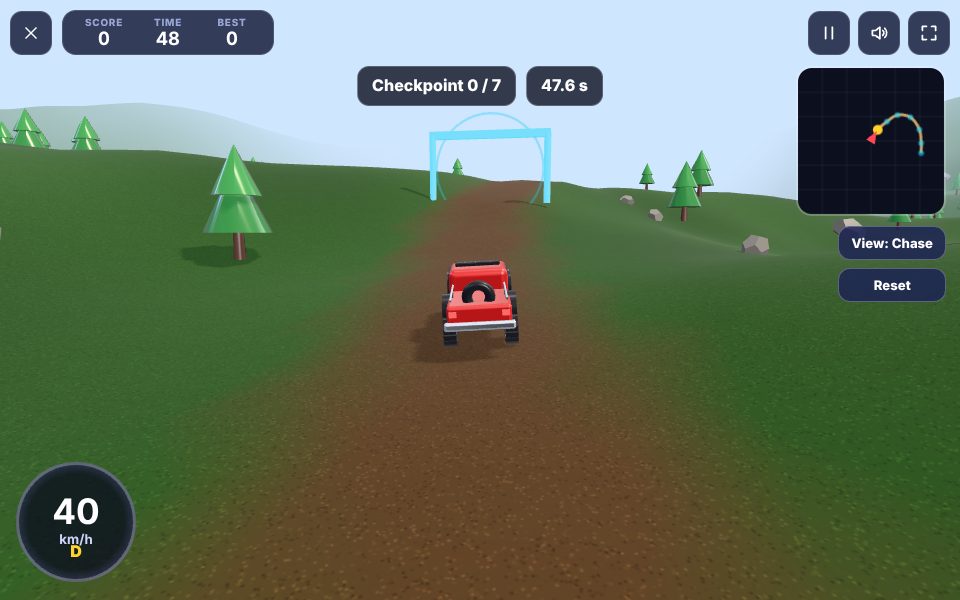
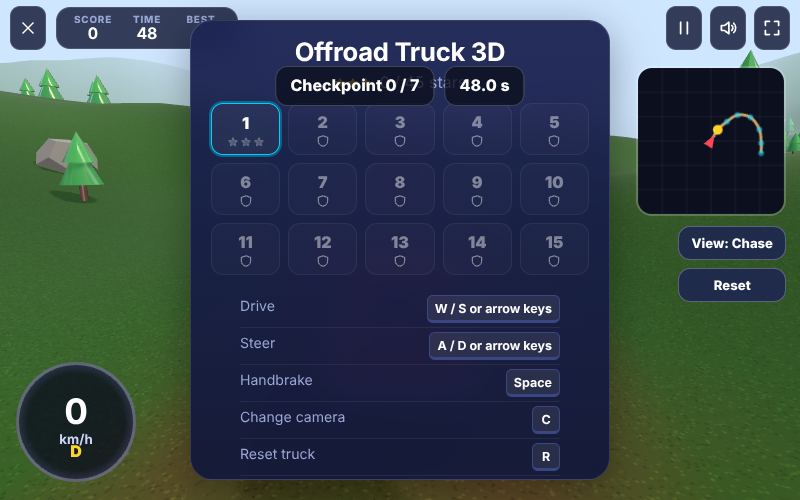
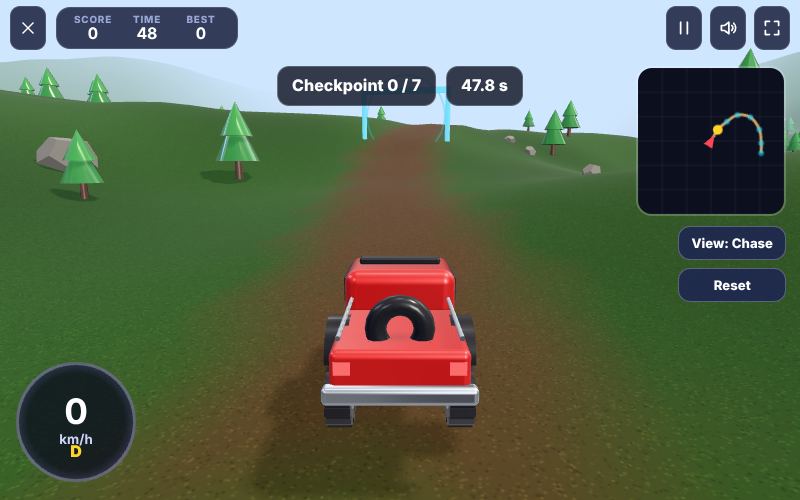
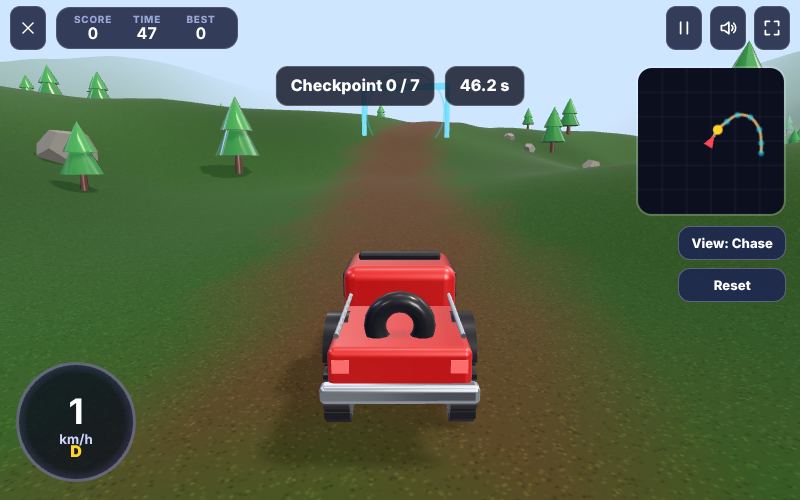
1The Offroad Truck 3D start screen. Press Play, or pick a level where the game has levels.2The first seconds of a game of Offroad Truck 3D. The score and your best score are shown at the top.3Offroad Truck 3D in the middle of play, after a few moves.
How a game works, step by step
1
Press W or the up arrow, or the gas pedal, to drive. S or the down arrow brakes, and reverses when stopped.
2
Steer with A and D, the arrow keys or the left and right buttons.
3
Drive through every checkpoint before the timer ends. The next one glows on the minimap.
4
Press C or View to change the camera, and R or Reset if the truck gets stuck.
5
Finish faster for more stars.
Controls diagram
Touch screen
Gas and brake pedalsDrive and reverse
Left and right buttonsSteer
View and reset buttonsChange camera, reset
Mouse
Click works the same as tapping.
Keyboard
W↑Accelerate
S↓Brake, then reverse
AD←→Steer
SpaceHandbrake
CChange camera view
RPut the truck back on the trail
Controls for Offroad Truck 3D on phones, tablets and computers.
Why people love Offroad Truck 3D
Sports games capture the satisfying moment when a well-judged shot does exactly what you intended. Offroad Truck 3D gives you that feeling many times in a single session. The physics are consistent, so practice pays off, and short rounds let you try again straight away. It is also a relaxed way to enjoy a sport without the equipment, the weather or the booking, whether you want a quick break or a longer session chasing a record.
The objective
Drive the truck through every checkpoint gate along the trail and reach the finish. Each of the 15 levels has a longer or rougher trail than the last and a time limit. Finish with plenty of time left to earn three stars and a bigger score.
Background: where Offroad Truck 3D comes from
Offroad Truck 3D is an original Xons Play driving game in full 3D. It simulates a heavy four-wheel-drive truck on rough mountain terrain: each wheel has its own suspension that reads the ground under it, the truck body leans and pitches realistically, and the trail winds through forests, canyons and snowy passes.
Controls explained
Device
Input
What it does
Keyboard
W or Up
Accelerate
Keyboard
S or Down
Brake, then reverse
Keyboard
A and D or Left and Right
Steer
Keyboard
Space
Handbrake
Keyboard
C
Change camera view
Keyboard
R
Put the truck back on the trail
Touch
Gas and brake pedals
Drive and reverse
Touch
Left and right buttons
Steer
Touch
View and reset buttons
Change camera, reset
The controls are the same on every level and in every mode, so once they feel natural you can focus fully on the game. Keyboard players get the most precise control, while touch players get large, thumb-friendly buttons.
Your first game of Offroad Truck 3D
Press the Play button under the game title. Offroad Truck 3D loads in a few seconds and starts in full screen on phones.
Step 1. Press W or the up arrow, or the gas pedal, to drive. S or the down arrow brakes, and reverses when stopped. Take your time on the first attempt and get a feel for how the game responds.
Step 2. Steer with A and D, the arrow keys or the left and right buttons.
Step 3. Drive through every checkpoint before the timer ends. The next one glows on the minimap.
Step 4. Press C or View to change the camera, and R or Reset if the truck gets stuck.
Step 5. Finish faster for more stars. That is the whole loop. Every game of Offroad Truck 3D follows this pattern, with new situations each time.
On a keyboard you can use W or Up to accelerate, S or Down to brake, then reverse, A and D or Left and Right to steer, Space to handbrake, C to change camera view, R to put the truck back on the trail. Remember the objective: Drive the truck through every checkpoint gate along the trail and reach the finish. Once that is clear, every decision becomes easier, because you can ask whether a move brings you closer to it.
Offroad Truck 3D strategy
Slow in, fast out
Brake before a corner while the truck is straight, then accelerate as you come out of it. Braking in the middle of a turn on loose ground makes the back slide.
Pick a camera that suits you
There are six views: chase, far chase, bonnet, cabin, top down and cinematic. Far chase shows the most of the trail ahead; cabin feels the most real.
Keep wheels on the ground
A truck in the air cannot steer or brake. Ease off before crests so all four wheels stay in contact.
Use the minimap
The minimap shows the trail ahead and the next gate. Glance at it before blind corners and hilltops.
Reset instead of struggling
If the truck is stuck or on its side, press R to put it back on the trail at the nearest point.
A closer look at Offroad Truck 3D
The truck in Offroad Truck 3D is simulated with four independent springs, so every bump is felt by one wheel before the others. When the front left wheel climbs a rock, the body tilts, weight moves to the other wheels and their grip changes. This is why a steady line matters more than speed: a truck that takes the smooth part of the trail keeps all four wheels loaded and climbs steep slopes that a faster, bouncier truck cannot. On loose canyon dirt, try climbing at a constant moderate speed rather than charging the hill. In the snow, brake earlier than you think and use the handbrake only for very tight bends. The cinematic camera is great for watching the suspension work, and the bonnet camera is the best way to judge the exact line over rocks.
Common mistakes and how to fix them
Full throttle downhill
A heavy truck gains speed quickly on descents. Use the brake early and steer gently.
Missing a gate
Gates must be driven through in order. If you miss one, turn back and drive through it.
Oversteering
Small steering inputs are enough at speed. Big ones make the truck sway and roll.
Driving into water
The trail stays above the water, but deep water slows the truck badly. Stay on the road.
Levels, difficulty and progression
There are 15 levels spread across three maps: Pine Forest, Red Canyon and Snow Pass. Pine Forest has gentle hills and soft turns, Red Canyon has steep climbs and tight switchbacks among cactus and red rock, and Snow Pass combines tall slopes with slippery snow. Later levels add more gates, longer trails and rougher ground. We rate Offroad Truck 3D as medium (3 out of 5), with a typical session of 5 to 15 minutes.
What Offroad Truck 3D trains
Offroad Truck 3D turns a physical sport into a game of touch and timing. You do not need to be athletic, but you do need car control, planning, spatial awareness. The physics behave consistently, so every shot teaches you something: a little more power here, a slightly different angle there. That feedback loop is what makes sports games so satisfying, because you can feel yourself improving within a single session of 5 to 15 minutes. It is also a good way to understand the real sport, since the angles, speeds and scoring follow the same ideas.
How to practise and improve
The fastest way to improve at Offroad Truck 3D is consistency. Try to repeat the same movement for the same situation, so your hand learns it. Once a shot becomes reliable, add variation such as angle or spin. Playing against the computer gives a stable opponent, and playing friends online adds the pressure of a real match.
Playing on phone, tablet and computer
Offroad Truck 3D runs directly in your web browser on phones, tablets, laptops and desktop computers. There is nothing to install and no account needed. On a phone, the game adapts its controls to touch, with large buttons and swipe gestures sized for thumbs. On a computer, you can use the mouse and keyboard, which many players find more precise. Tablets give you the best of both: a big screen with touch controls. For the smoothest experience, close other heavy tabs, keep your browser up to date, and use the fullscreen button in the game bar. If you play on a phone with a small screen, turning it sideways usually gives you a wider view. The game saves your progress and best scores in your browser, so playing on the same device keeps your records.
Playing alone and sharing scores
Offroad Truck 3D is a single-player game, which means you can play at your own pace whenever you like. Your best score and progress are saved on your device, so every session builds on the last. It also makes a fun challenge to share: play a round, tell your friends your score, and see who can beat it. Many families pass a tablet around and take turns, which turns a solo game into a group activity.
Goals for every level of player
Beginner
Learn the controls and the objective, and finish a full game of Offroad Truck 3D without rushing. Slow down before steep downhill sections: the truck can roll over. Do not worry about winning yet; focus on understanding why things happen.
Intermediate
Start using the first two strategy ideas on this page: slow in, fast out and pick a camera that suits you. Try to avoid the common mistakes listed above, and notice when you make them.
Advanced
Combine every idea: keep wheels on the ground and use the minimap. Chase a personal best you thought was out of reach, and think a step further ahead than your opponent.
Accessibility and comfort settings
Offroad Truck 3D is designed to be comfortable for as many people as possible. Every button is large enough for touch, text uses high-contrast colours on a dark background, and important information is shown with both colour and shape or text, so the game stays readable for players with colour vision differences. Sound can be switched off with the speaker button at any time, and no part of the game depends on hearing. The fullscreen button removes distractions and makes everything larger on small screens. If you prefer playing with one hand, the touch controls work with a single thumb, and most actions can also be done with a mouse or keyboard alone.
Tracking your progress
Your progress in Offroad Truck 3D is saved automatically in your browser. Your best score appears under the title on the game page, and level-based games keep your stars and unlocked levels. Because records live on this device, clearing your browser data or using private browsing will reset them. To track improvement, note your best score each week and compare. Small, steady increases are a sign that the strategies on this page are working.
Glossary
Checkpoint gate
A gate on the trail that you must drive through in order.
Suspension travel
How far each wheel can move up and down to follow the ground.
Handbrake
Locks the rear wheels for sharp turns or stopping on a slope.
Chase camera
A view from behind the truck.
Reset
Puts the truck back on the trail facing the right way.
Switchback
A sharp bend where the trail turns back on itself to climb a slope.
Fair play and healthy habits
We want Offroad Truck 3D to be a friendly place to play. Be kind in chat, accept wins and losses gracefully, and remember that there is a real person behind every seat in online games. Take regular breaks, especially during long sessions: rest your eyes for a minute every half hour and stretch your hands. Parents can play alongside younger children to explain the rules and keep sessions to a sensible length. Xons Play does not sell in-game items or loot boxes, so every player has the same chance and nothing can be bought to win. If you ever see behaviour that spoils the game for others, contact us through the Contact page.
If you like Offroad Truck 3D, try these
Players who enjoy Offroad Truck 3D often like these games too. Each one is free and runs in the same browser window.
Carrom: A polished wooden board, a smooth striker and physics that feel like the real thing. It is another sports game, so the skills you build in Offroad Truck 3D carry over.
8 Ball Pool: A full-size 3D table, numbered balls and authoritative physics for fair, lag-free shots. It is another sports game, so the skills you build in Offroad Truck 3D carry over.
Basketball Shoot: Flick the ball towards the hoop and sink as many shots as you can. It is another sports game, so the skills you build in Offroad Truck 3D carry over.
Bowling 3D: Roll the ball down a polished lane and knock down all ten pins. It is another sports game, so the skills you build in Offroad Truck 3D carry over.
More questions about Offroad Truck 3D
Is Offroad Truck 3D free to play?
Yes. Offroad Truck 3D is completely free on Xons Play, with no download, no account and no in-game purchases. The site is supported by advertising.
How long does a game of Offroad Truck 3D take?
A typical session lasts 5 to 15 minutes. You can stop at any time and your best score stays saved on this device.
Is Offroad Truck 3D hard?
We rate it medium, 3 out of 5. The basics are quick to learn, and there is plenty of depth to explore.
Can children play Offroad Truck 3D?
Yes. Offroad Truck 3D has no violent or adult content. It is a single-player game, so there is no chat with strangers.
Does Offroad Truck 3D work offline?
The page needs an internet connection to load. Once a game has started, single-player games keep running even if the connection drops briefly.
Offroad Truck 3D FAQ
How many levels are there?
Fifteen routes across three regions, each with its own time limit and three stars to earn.
Can I change the camera?
Yes, there are six views: chase, far chase, bonnet, cabin, top down and cinematic.
Does it work on phones?
Yes, with steering buttons and pedals. Turn your phone sideways.
We use cookies and similar technologies to keep you signed in to games, measure traffic and show ads (including personalised ads by Google). See our Cookie Policy.