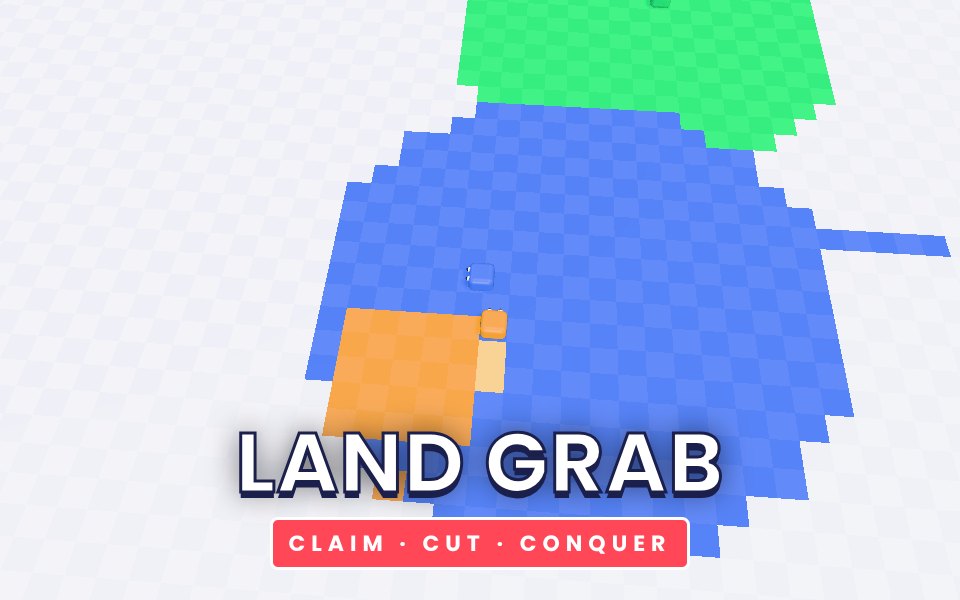
Land Grab is a fast territory game. Your block starts on a small patch of land on a big field. As soon as you leave your land you draw a trail behind you, and when you come back home everything inside the loop becomes yours. The bigger the loop, the more land you claim, but your trail is your weak point: if a rival crosses it you are knocked out, and if you cross your own trail it is over too. Rivals play by the same rules, so you can cut their trails to knock them out and win back the field. Every level asks you to own a bigger share of the map against more and smarter opponents, up to 25 levels.
How to play
Turn with the arrow keys or WASD, or swipe on a touch screen. You keep moving forward on your own.
Leave your land to draw a trail, then come back to fill the loop with your colour.
Cross a rival trail to knock that rival out and free their land.
Reach the target percentage of land shown at the top to finish the level.
Tips
Start with small, safe loops close to home, and only go big when no rival is near.
Watch the rivals: if one turns toward your trail, head home immediately.
Long straight trails are easy to cut. Keep your loops compact.
Rivals are most vulnerable when they are far from home with a long trail.
The complete Land Grab guide
This is the complete guide to Land Grab on Xons Play: what the game is, how the controls work, a visual walkthrough with real screenshots, strategy from beginner to advanced, the mistakes most players make and how to avoid them. Read it from top to bottom before your first game, or jump to the section you need.
At a glance
Players1 player
GenreArcade
Difficulty Easy to learn
Typical session1 to 4 minutes per level
Key skillsRisk management, awareness
Levels25
Works onPhone, tablet, PC
PriceFree, no download
Visual guide to Land Grab
How a game works, step by step
1
Turn with the arrow keys or WASD, or swipe on a touch screen. You keep moving forward on your own.
2
Leave your land to draw a trail, then come back to fill the loop with your colour.
3
Cross a rival trail to knock that rival out and free their land.
4
Reach the target percentage of land shown at the top to finish the level.
Controls diagram
Touch screen
SwipeTurn on phones
Mouse
Click works the same as tapping.
Keyboard
←↑↓→Turn
Controls for Land Grab on phones, tablets and computers.
Why people love Land Grab
Arcade games are built for one more go. Land Grab starts instantly, ends quickly and always leaves you thinking you could do better next time. That loop of short runs and steady improvement is one of the most satisfying in gaming. There are no menus to learn and no story to follow, just a clean challenge that rewards attention and practice, which makes it ideal for a few minutes at any time of day.
The objective
Own the target share of the map, shown at the top, before you are knocked out.
Background: where Land Grab comes from
Land Grab is a game about risk. Every second you spend outside your land you are building a bigger claim and a bigger target. This guide explains how claiming works, how to stay safe, and how to beat the more aggressive rivals in later levels.
Controls explained
Device
Input
What it does
Keyboard
Arrow keys or WASD
Turn
Touch
Swipe
Turn on phones
The controls are the same on every level and in every mode, so once they feel natural you can focus fully on the game. Keyboard players get the most precise control, while touch players get large, thumb-friendly buttons.
Your first game of Land Grab
Press the Play button under the game title. Land Grab loads in a few seconds and starts in full screen on phones.
Step 1. Turn with the arrow keys or WASD, or swipe on a touch screen. You keep moving forward on your own. Take your time on the first attempt and get a feel for how the game responds.
Step 2. Leave your land to draw a trail, then come back to fill the loop with your colour.
Step 3. Cross a rival trail to knock that rival out and free their land.
Step 4. Reach the target percentage of land shown at the top to finish the level. That is the whole loop. Every game of Land Grab follows this pattern, with new situations each time.
On a keyboard you can use Arrow keys or WASD to turn. Remember the objective: Own the target share of the map, shown at the top, before you are knocked out. Once that is clear, every decision becomes easier, because you can ask whether a move brings you closer to it.
Land Grab strategy
Claim in small squares
A loop of a few cells out, a few across and back takes seconds and is almost impossible to cut. Many small claims beat one big one.
Use your edge
Start loops from the edge of your land and come back to a different part of the same edge. You claim everything between.
Watch heads, not trails
A rival heading toward your trail is a threat. A rival heading away is not. Turn home as soon as one turns toward you.
Cut the greedy
Rivals far from home with long trails are easy targets. Crossing a trail knocks the rival out and frees all their land.
A closer look at Land Grab
The map grows and the number of rivals rises through the 25 levels, and later rivals hunt your trail more often.
Common mistakes and how to fix them
Doubling back
You cannot turn straight back on yourself, and crossing your own trail ends the run.
Long straight lines
A long straight trail is easy to cut from the side.
Hugging the map edge
The edge of the map ends the run if you drive into it.
Levels, difficulty and progression
When you return home, the game fills every cell that your trail and your land now enclose, including land that belonged to rivals. We rate Land Grab as easy to learn (2 out of 5), with a typical session of 1 to 4 minutes per level.
What Land Grab trains
Land Grab is an arcade game in the classic sense: easy to start, hard to master and built around one more go. It sharpens risk management, awareness, and every run of 1 to 4 minutes per level is a fresh chance to beat your best score. Arcade games are known to improve hand and eye coordination and reaction time, and they are also a good way to practise staying calm under pressure, because panic is usually what ends a run. The rules never change, so every improvement in your score is a real improvement in your play.
How to practise and improve
Arcade skill comes from rhythm. In Land Grab, try to find a steady pace and keep it, rather than reacting to every single thing on screen. Look ahead instead of at your character, and keep movements small. If you keep failing at the same spot, slow down there next time. Small adjustments add up to big score gains.
Playing on phone, tablet and computer
Land Grab runs directly in your web browser on phones, tablets, laptops and desktop computers. There is nothing to install and no account needed. On a phone, the game adapts its controls to touch, with large buttons and swipe gestures sized for thumbs. On a computer, you can use the mouse and keyboard, which many players find more precise. Tablets give you the best of both: a big screen with touch controls. For the smoothest experience, close other heavy tabs, keep your browser up to date, and use the fullscreen button in the game bar. If you play on a phone with a small screen, turning it sideways usually gives you a wider view. The game saves your progress and best scores in your browser, so playing on the same device keeps your records.
Playing alone and sharing scores
Land Grab is a single-player game, which means you can play at your own pace whenever you like. Your best score and progress are saved on your device, so every session builds on the last. It also makes a fun challenge to share: play a round, tell your friends your score, and see who can beat it. Many families pass a tablet around and take turns, which turns a solo game into a group activity.
Goals for every level of player
Beginner
Learn the controls and the objective, and finish a full game of Land Grab without rushing. Start with small, safe loops close to home, and only go big when no rival is near. Do not worry about winning yet; focus on understanding why things happen.
Intermediate
Start using the first two strategy ideas on this page: claim in small squares and use your edge. Try to avoid the common mistakes listed above, and notice when you make them.
Advanced
Combine every idea: watch heads, not trails and cut the greedy. Chase a personal best you thought was out of reach, and think a step further ahead than your opponent.
Accessibility and comfort settings
Land Grab is designed to be comfortable for as many people as possible. Every button is large enough for touch, text uses high-contrast colours on a dark background, and important information is shown with both colour and shape or text, so the game stays readable for players with colour vision differences. Sound can be switched off with the speaker button at any time, and no part of the game depends on hearing. The fullscreen button removes distractions and makes everything larger on small screens. If you prefer playing with one hand, the touch controls work with a single thumb, and most actions can also be done with a mouse or keyboard alone.
Tracking your progress
Your progress in Land Grab is saved automatically in your browser. Your best score appears under the title on the game page, and level-based games keep your stars and unlocked levels. Because records live on this device, clearing your browser data or using private browsing will reset them. To track improvement, note your best score each week and compare. Small, steady increases are a sign that the strategies on this page are working.
Glossary
Trail
The line you leave while you are outside your land.
Claim
Returning home to fill the area inside your loop.
Cut
Crossing a rival's trail, which knocks them out.
Fair play and healthy habits
We want Land Grab to be a friendly place to play. Be kind in chat, accept wins and losses gracefully, and remember that there is a real person behind every seat in online games. Take regular breaks, especially during long sessions: rest your eyes for a minute every half hour and stretch your hands. Parents can play alongside younger children to explain the rules and keep sessions to a sensible length. Xons Play does not sell in-game items or loot boxes, so every player has the same chance and nothing can be bought to win. If you ever see behaviour that spoils the game for others, contact us through the Contact page.
If you like Land Grab, try these
Players who enjoy Land Grab often like these games too. Each one is free and runs in the same browser window.
Snake 3D: Guide a glossy 3D snake to the apples and grow as long as you dare. It is another arcade game, so the skills you build in Land Grab carry over.
Brick Breaker: Bounce a glowing ball off your paddle and smash every brick. It is another arcade game, so the skills you build in Land Grab carry over.
Pong 3D: The original video game duel, rebuilt as a neon 3D table against the computer. It is another arcade game, so the skills you build in Land Grab carry over.
Sky Hopper: Tap to flap through the gaps in an endless sky of floating pillars. It is another arcade game, so the skills you build in Land Grab carry over.
More questions about Land Grab
Is Land Grab free to play?
Yes. Land Grab is completely free on Xons Play, with no download, no account and no in-game purchases. The site is supported by advertising.
How long does a game of Land Grab take?
A typical session lasts 1 to 4 minutes per level. You can stop at any time and your best score stays saved on this device.
Is Land Grab hard?
We rate it easy to learn, 2 out of 5. Most people understand it within a minute.
Can children play Land Grab?
Yes. Land Grab has no violent or adult content. It is a single-player game, so there is no chat with strangers.
Does Land Grab work offline?
The page needs an internet connection to load. Once a game has started, single-player games keep running even if the connection drops briefly.
Land Grab FAQ
What happens if I touch my own trail?
You are knocked out and the level ends, just like being cut by a rival.
How many levels are there?
Twenty five. The map grows and rivals become more numerous and aggressive.
We use cookies and similar technologies to keep you signed in to games, measure traffic and show ads (including personalised ads by Google). See our Cookie Policy.