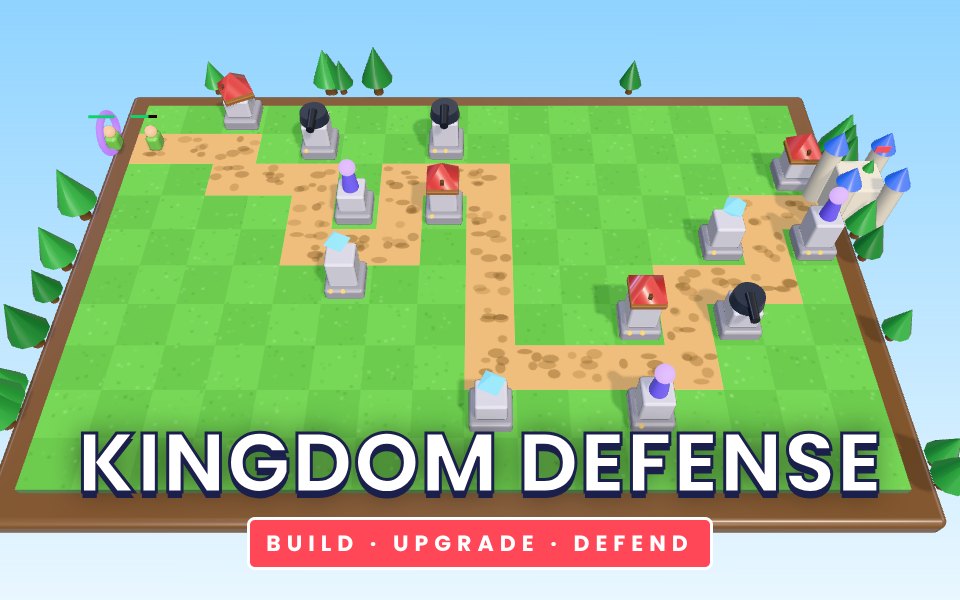
Kingdom Defense is a 3D tower defense game with 30 hand-tuned levels. Each level lays a new winding road across the meadow, from a glowing portal to your castle, and sends wave after wave of invaders down it. You start with a little gold and earn more for every enemy defeated. Archer towers fire fast arrows, Cannons smash groups with splash damage, Frost towers slow everything they touch, and Storm towers, unlocked from level 4, chain lightning between enemies. Every tower can be upgraded twice for more damage and range, and sold if you need to rebuild. Invaders come in six kinds: ordinary grunts, quick runners, armoured tanks that shrug off arrows and cannonballs, healers that mend their friends, warded soldiers that resist magic, and a giant boss every five levels. Twenty enemies reaching the castle ends the level, so every tower placement counts.
How to play
Click or tap a grass tile to open the build menu and choose a tower.
Click or tap a tower to see its range, upgrade it or sell it for 70 percent of its cost.
Press Start wave when you are ready. After each wave the next starts automatically, or call it early for bonus gold.
Use the speed button (or F) to play at 1x, 2x or 3x speed. Space starts the next wave.
Clear every wave with the castle standing to finish the level. Lose fewer lives for more stars.
Tips
Build early towers where the road bends: towers at a corner can hit enemies on two stretches of road.
Mix damage types. Tanks have armour against arrows and cannonballs, and warded enemies resist frost and lightning.
Kill healers first, or they will keep the rest of the wave alive.
Frost towers do little damage but make every other tower more effective.
Save gold before boss waves on levels 5, 10, 15, 20, 25 and 30.
The complete Kingdom Defense guide
This is the complete guide to Kingdom Defense on Xons Play: what the game is, how the controls work, a visual walkthrough with real screenshots, strategy from beginner to advanced, the mistakes most players make and how to avoid them. Read it from top to bottom before your first game, or jump to the section you need.
At a glance
Players1 player
GenreAction
Difficulty Easy to learn
Typical session5 to 12 minutes per level
Key skillsPlanning, resource management, timing
Levels30
Works onPhone, tablet, PC
PriceFree, no download
Visual guide to Kingdom Defense
How a game works, step by step
1
Click or tap a grass tile to open the build menu and choose a tower.
2
Click or tap a tower to see its range, upgrade it or sell it for 70 percent of its cost.
3
Press Start wave when you are ready. After each wave the next starts automatically, or call it early for bonus gold.
4
Use the speed button (or F) to play at 1x, 2x or 3x speed. Space starts the next wave.
5
Clear every wave with the castle standing to finish the level. Lose fewer lives for more stars.
Controls diagram
Touch screen
Tap works the same as clicking.
Mouse
Click or tap grassOpen the build menu
Click or tap a towerUpgrade or sell it
Keyboard
SpaceStart or call the next wave
FChange game speed
Controls for Kingdom Defense on phones, tablets and computers.
Why people love Kingdom Defense
Action games make your heart beat faster. Kingdom Defense throws something new at you every few seconds, and getting through a tough moment feels genuinely exciting. Failing is quick and restarting is instant, so the game keeps you in the flow. Over time you notice yourself reacting faster and reading situations earlier, which is a satisfying kind of progress that you can feel in your hands.
The objective
Survive every wave of the level with the castle standing. Twenty invaders reaching the castle ends the level (a boss counts as ten). The fewer lives you lose, the more stars you earn.
Background: where Kingdom Defense comes from
Tower defense is a planning game disguised as an action game. Kingdom Defense gives you one road, a castle and a purse of gold, and asks you to decide where every coin goes before the enemies decide for you. This guide explains the four towers, the six invaders and the habits that carry you through all thirty levels.
Controls explained
Device
Input
What it does
Mouse
Click or tap grass
Open the build menu
Mouse
Click or tap a tower
Upgrade or sell it
Keyboard
Space
Start or call the next wave
Keyboard
F
Change game speed
The controls are the same on every level and in every mode, so once they feel natural you can focus fully on the game. Keyboard players get the most precise control, while touch players get large, thumb-friendly buttons.
Your first game of Kingdom Defense
Press the Play button under the game title. Kingdom Defense loads in a few seconds and starts in full screen on phones.
Step 1. Click or tap a grass tile to open the build menu and choose a tower. Take your time on the first attempt and get a feel for how the game responds.
Step 2. Click or tap a tower to see its range, upgrade it or sell it for 70 percent of its cost.
Step 3. Press Start wave when you are ready. After each wave the next starts automatically, or call it early for bonus gold.
Step 4. Use the speed button (or F) to play at 1x, 2x or 3x speed. Space starts the next wave.
Step 5. Clear every wave with the castle standing to finish the level. Lose fewer lives for more stars. That is the whole loop. Every game of Kingdom Defense follows this pattern, with new situations each time.
On a keyboard you can use Space to start or call the next wave, F to change game speed. Remember the objective: Survive every wave of the level with the castle standing. Once that is clear, every decision becomes easier, because you can ask whether a move brings you closer to it.
Kingdom Defense strategy
Read the road first
Find the bends and the long straights before you build. A tower placed inside a bend can shoot at the road on two or three sides, which doubles its time on target.
Open with archers
Archers are cheap and fast, which is exactly what the first waves of grunts and runners need. Two archers on the first bend usually clear the opening waves on their own.
Add frost before you add power
A frost tower slows everything in its range by half, so every other tower hits each enemy twice as often. One frost tower in front of your damage towers is worth more than a third archer.
Answer armour with magic
Tanks ignore much of the damage from arrows and cannonballs. From level 4, Storm towers chain lightning that ignores armour, and frost damage is magic too.
Bank for boss waves
Levels 5, 10, 15, 20, 25 and 30 end with a boss. Upgrade your best placed towers to tier 3 before the final wave rather than spreading gold thinly.
A closer look at Kingdom Defense
Each level is generated from its level number, so the road is the same every time you replay it and you can plan a better layout on the second try.
Common mistakes and how to fix them
Building at the castle end
Towers near the castle only get one chance. Build early in the road and let enemies walk through your whole defence.
Ignoring healers
Healers mend everything around them. Focus them with archers before they reach your cannons.
Calling waves too early
The early-call bonus is tempting, but overlapping waves are how lives disappear on the harder levels.
Levels, difficulty and progression
Every tower has three tiers. Each upgrade multiplies damage by one and a half, adds range and shortens the reload. Selling returns seventy percent of everything you spent on that tower, so moving a tower late in a level is expensive. We rate Kingdom Defense as easy to learn (2 out of 5), with a typical session of 5 to 12 minutes per level.
What Kingdom Defense trains
Fast and full of surprises, Kingdom Defense keeps you on your toes. Each run of 5 to 12 minutes per level is a test of planning, resource management, timing, and every mistake shows you something new. The thrill of finally getting past a tricky moment is what makes action games so rewarding, and why people keep coming back for one more try.
How to practise and improve
In Kingdom Defense, memory is as important as reflexes. Notice where things went wrong and plan for them on the next attempt. Slow, controlled movement usually beats rushing. If you are stuck, try a different approach for a few attempts, such as waiting longer before a jump or taking a different route.
Playing on phone, tablet and computer
You can play Kingdom Defense on almost any modern device. Chrome, Safari, Edge and Firefox all work, on Android, iPhone, iPad, Windows, macOS and Linux. Touch controls appear automatically on phones and tablets, and keyboard shortcuts work on computers. If the game ever feels slow, try closing other tabs or switching to the flat board view where available, which uses less graphics power. Your settings and progress are stored in your browser on this device, so private browsing modes will forget them when you close the window.
Playing alone and sharing scores
Because Kingdom Defense is played alone, it is perfect for short breaks. There is no waiting for other players and no pressure. Set yourself small goals, such as beating your best score or clearing a few more levels than yesterday. If you enjoy competition, compare scores with friends and challenge them to beat yours on their own device.
Goals for every level of player
Beginner
Learn the controls and the objective, and finish a full game of Kingdom Defense without rushing. Build early towers where the road bends: towers at a corner can hit enemies on two stretches of road. Do not worry about winning yet; focus on understanding why things happen.
Intermediate
Start using the first two strategy ideas on this page: read the road first and open with archers. Try to avoid the common mistakes listed above, and notice when you make them.
Advanced
Combine every idea: add frost before you add power and answer armour with magic. Chase a personal best you thought was out of reach, and think a step further ahead than your opponent.
Accessibility and comfort settings
We have tried to keep Kingdom Defense easy on the eyes and hands. The interface uses clear, large text and strong contrast, colours are never the only way information is shown, and animations stay short. You can mute all sound from the game bar, switch to fullscreen to make the board bigger, and on board games use the flat view for a simple top-down layout. Keyboard and mouse controls are available on computers for players who find touch screens tiring, and there are no time-critical menus.
Tracking your progress
Kingdom Defense remembers your best results on this device, so every session starts where the last one ended. A good habit is to set a target before you play, such as beating your best by ten percent, and to stop after reaching it. If you play on several devices, each keeps its own records. Progress stays private to you: nothing is shared unless you choose to tell friends your score.
Glossary
Splash
Damage that hits every enemy in a small area, like the Cannon.
Slow
A frost effect that halves an enemy's speed for a short time.
Chain
Storm lightning that jumps from one enemy to the next.
Armour
Reduces arrow and cannonball damage.
Ward
Reduces frost and lightning damage.
Fair play and healthy habits
Good sportsmanship makes Kingdom Defense more fun for everyone. Congratulate opponents on a good game, avoid leaving mid-match, and keep chat friendly. For healthy play, set a time limit before you start, sit comfortably with the screen at eye level and take breaks between sessions. There are no purchases in Kingdom Defense, so success comes only from skill and practice. Families can use the game as shared time together, talking about decisions and celebrating good moves.
If you like Kingdom Defense, try these
Players who enjoy Kingdom Defense often like these games too. Each one is free and runs in the same browser window.
Sneaky Crew: Up to 10 players, three maps and a Sneak hiding among the crew. Do tasks, find frozen crewmates and vote the Sneak out. It is another action game, so the skills you build in Kingdom Defense carry over.
Troll Squad: A co-op troll platformer for 2 to 4 players: 500 levels of shared doors, head-stacking, plot twists and squad wipes. It is another action game, so the skills you build in Kingdom Defense carry over.
Troll Party: A chaotic 2D troll race for up to 5 players: 500 levels of fake floors, runaway doors, prank buttons and plot twists. It is another action game, so the skills you build in Kingdom Defense carry over.
Rail Rush: Race from a sunlit city through the fires of Hell and up into Heaven, dodging trains all the way. It is another action game, so the skills you build in Kingdom Defense carry over.
More questions about Kingdom Defense
Is Kingdom Defense free to play?
Yes. Kingdom Defense is completely free on Xons Play, with no download, no account and no in-game purchases. The site is supported by advertising.
How long does a game of Kingdom Defense take?
A typical session lasts 5 to 12 minutes per level. You can stop at any time and your best score stays saved on this device.
Is Kingdom Defense hard?
We rate it easy to learn, 2 out of 5. Most people understand it within a minute.
Can children play Kingdom Defense?
Yes. Kingdom Defense has no violent or adult content. It is a single-player game, so there is no chat with strangers.
Does Kingdom Defense work offline?
The page needs an internet connection to load. Once a game has started, single-player games keep running even if the connection drops briefly.
Kingdom Defense FAQ
How many levels are there?
Thirty, each with its own road and waves. Your progress and stars are saved on your device.
Can I play on a phone?
Yes. Tap tiles to build and tap towers to upgrade. Turn your phone sideways for the best view.
Is it hard?
The first levels teach the basics, but later levels and boss waves need careful planning and upgrades.
We use cookies and similar technologies to keep you signed in to games, measure traffic and show ads (including personalised ads by Google). See our Cookie Policy.