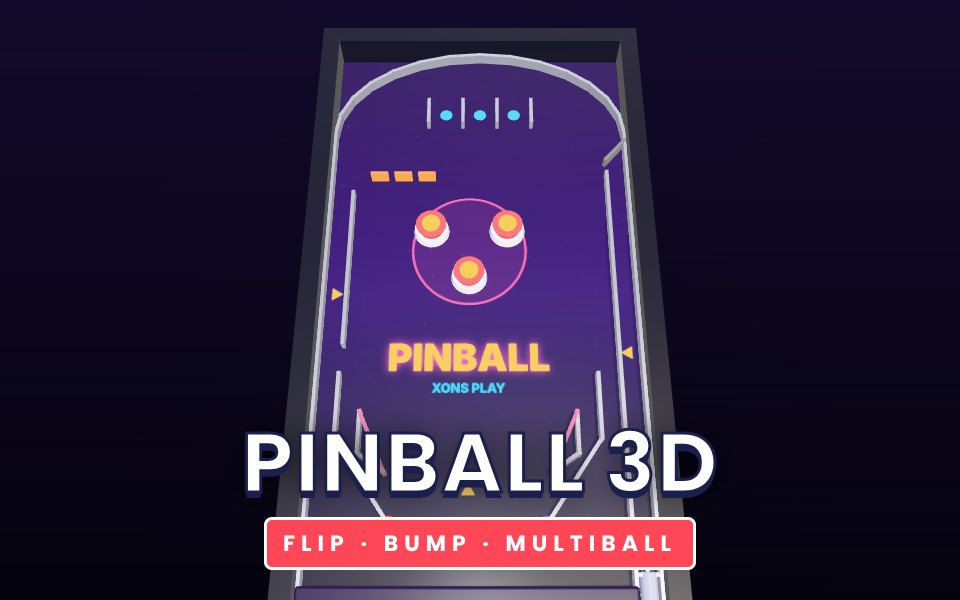
Pinball 3D is a complete arcade pinball table that runs in your browser. Pull back the spring plunger and fire the steel ball onto a neon playfield. Three pop bumpers send it flying, the slingshots above the flippers kick it back into play, and a row of drop targets waits at the top left: knock all three down to start multiball, with two extra balls in play at once. Roll through all three top lanes to raise the bonus multiplier up to five times, and shoot the left orbit for a thousand points a lap. The ball moves with real physics, so timing your flipper and catching the ball on the flipper tip gives you control. You get three balls and a ball save just after each launch.
How to play
Press the left arrow, Z or left Shift for the left flipper, and the right arrow, / or right Shift for the right flipper.
Hold Space or the down arrow to pull the plunger back, and release to launch. A longer pull launches harder.
On a phone, touch the left or right half of the screen for each flipper. When a ball is waiting in the launch lane, hold anywhere and release to fire.
The game ends when your third ball drains.
Tips
Hold a flipper up to trap the ball, then let it roll down the flipper before you shoot to aim.
Hit the ball with the middle of the flipper for power and with the tip for a steep shot up the table.
Clear the drop targets early: multiball scores everything faster.
Complete the top lanes as often as you can. The multiplier applies to every point.
The complete Pinball 3D guide
This is the complete guide to Pinball 3D on Xons Play: what the game is, how the controls work, a visual walkthrough with real screenshots, strategy from beginner to advanced, the mistakes most players make and how to avoid them. Read it from top to bottom before your first game, or jump to the section you need.
At a glance
Players1 player
GenreArcade
Difficulty Very easy
Typical session3 to 10 minutes per game
Key skillsTiming, control
GoalBeat your best score
Works onPhone, tablet, PC
PriceFree, no download
Visual guide to Pinball 3D
How a game works, step by step
1
Press the left arrow, Z or left Shift for the left flipper, and the right arrow, / or right Shift for the right flipper.
2
Hold Space or the down arrow to pull the plunger back, and release to launch. A longer pull launches harder.
3
On a phone, touch the left or right half of the screen for each flipper. When a ball is waiting in the launch lane, hold anywhere and release to fire.
4
The game ends when your third ball drains.
Controls diagram
Touch screen
Left or right half of screenFlippers on phones
Mouse
Click works the same as tapping.
Keyboard
←ZLeft flipper
→Right flipper
Space↓Pull the plunger
Controls for Pinball 3D on phones, tablets and computers.
Why people love Pinball 3D
Arcade games are built for one more go. Pinball 3D starts instantly, ends quickly and always leaves you thinking you could do better next time. That loop of short runs and steady improvement is one of the most satisfying in gaming. There are no menus to learn and no story to follow, just a clean challenge that rewards attention and practice, which makes it ideal for a few minutes at any time of day.
The objective
Score as many points as you can with three balls. A short ball save after each launch gives you a free second chance.
Background: where Pinball 3D comes from
Pinball rewards control more than reflexes. Pinball 3D uses real ball physics, so the same flipper timing gives the same shot. This guide covers flipper technique and the table's scoring features.
Controls explained
Device
Input
What it does
Keyboard
Left arrow, Z, Left Shift
Left flipper
Keyboard
Right arrow, /, Right Shift
Right flipper
Keyboard
Space or Down (hold)
Pull the plunger
Touch
Left or right half of screen
Flippers on phones
The controls are the same on every level and in every mode, so once they feel natural you can focus fully on the game. Keyboard players get the most precise control, while touch players get large, thumb-friendly buttons.
Your first game of Pinball 3D
Press the Play button under the game title. Pinball 3D loads in a few seconds and starts in full screen on phones.
Step 1. Press the left arrow, Z or left Shift for the left flipper, and the right arrow, / or right Shift for the right flipper. Take your time on the first attempt and get a feel for how the game responds.
Step 2. Hold Space or the down arrow to pull the plunger back, and release to launch. A longer pull launches harder.
Step 3. On a phone, touch the left or right half of the screen for each flipper. When a ball is waiting in the launch lane, hold anywhere and release to fire.
Step 4. The game ends when your third ball drains. That is the whole loop. Every game of Pinball 3D follows this pattern, with new situations each time.
On a keyboard you can use Left arrow, Z, Left Shift to left flipper, Right arrow, /, Right Shift to right flipper, Space or Down (hold) to pull the plunger. Remember the objective: Score as many points as you can with three balls. Once that is clear, every decision becomes easier, because you can ask whether a move brings you closer to it.
Pinball 3D strategy
Trap the ball
Hold a flipper up as the ball comes down. It will roll to the base and stop. Now you can choose your shot instead of reacting.
Aim with the contact point
Hitting the ball near the flipper base sends it across the table; hitting it near the tip sends it steeply up the far side.
Clear the drop targets
Knocking down all three drop targets at the top left starts multiball with two extra balls.
Light the top lanes
Rolling through all three top lanes raises the bonus multiplier, which multiplies every point you score afterwards.
A closer look at Pinball 3D
The table runs a full physics simulation twelve times every frame, so fast balls never pass through flippers or walls.
Common mistakes and how to fix them
Flipping at everything
Flipping too early or too often sends the ball into the outlanes.
Ignoring the orbit
The left orbit is worth a thousand points every time the ball runs round it.
Panicking in multiball
Concentrate on one ball at a time and let the others bounce.
Levels, difficulty and progression
Bumpers score 100, slingshots 30, drop targets 500, the orbit 1000 and completing the drop target bank 5000, all multiplied by the current bonus multiplier. We rate Pinball 3D as very easy (1 out of 5), with a typical session of 3 to 10 minutes per game.
What Pinball 3D trains
The appeal of Pinball 3D is its clarity. You always know why a run ended, and you always know you could do better. That makes it a quick, honest test of timing, control. A few runs of 3 to 10 minutes per game are perfect for a short break, and because your best score is saved on your device, you can return later and see whether practice has paid off.
How to practise and improve
To push your best score in Pinball 3D, focus on staying alive rather than collecting everything. Most runs end because of one greedy move. Play a few runs where your only goal is to survive longer, then add bonuses back in. Take a short break after a few attempts, because tired eyes react more slowly. Playing in fullscreen also helps you see further ahead.
Playing on phone, tablet and computer
You can play Pinball 3D on almost any modern device. Chrome, Safari, Edge and Firefox all work, on Android, iPhone, iPad, Windows, macOS and Linux. Touch controls appear automatically on phones and tablets, and keyboard shortcuts work on computers. If the game ever feels slow, try closing other tabs or switching to the flat board view where available, which uses less graphics power. Your settings and progress are stored in your browser on this device, so private browsing modes will forget them when you close the window.
Playing alone and sharing scores
Because Pinball 3D is played alone, it is perfect for short breaks. There is no waiting for other players and no pressure. Set yourself small goals, such as beating your best score or clearing a few more levels than yesterday. If you enjoy competition, compare scores with friends and challenge them to beat yours on their own device.
Goals for every level of player
Beginner
Learn the controls and the objective, and finish a full game of Pinball 3D without rushing. Hold a flipper up to trap the ball, then let it roll down the flipper before you shoot to aim. Do not worry about winning yet; focus on understanding why things happen.
Intermediate
Start using the first two strategy ideas on this page: trap the ball and aim with the contact point. Try to avoid the common mistakes listed above, and notice when you make them.
Advanced
Combine every idea: clear the drop targets and light the top lanes. Chase a personal best you thought was out of reach, and think a step further ahead than your opponent.
Accessibility and comfort settings
We have tried to keep Pinball 3D easy on the eyes and hands. The interface uses clear, large text and strong contrast, colours are never the only way information is shown, and animations stay short. You can mute all sound from the game bar, switch to fullscreen to make the board bigger, and on board games use the flat view for a simple top-down layout. Keyboard and mouse controls are available on computers for players who find touch screens tiring, and there are no time-critical menus.
Tracking your progress
Pinball 3D remembers your best results on this device, so every session starts where the last one ended. A good habit is to set a target before you play, such as beating your best by ten percent, and to stop after reaching it. If you play on several devices, each keeps its own records. Progress stays private to you: nothing is shared unless you choose to tell friends your score.
Glossary
Outlane
The lane outside each flipper. A ball that goes down it is lost.
Multiball
More than one ball in play at once.
Ball save
A few seconds after launch when a lost ball is returned.
Fair play and healthy habits
Good sportsmanship makes Pinball 3D more fun for everyone. Congratulate opponents on a good game, avoid leaving mid-match, and keep chat friendly. For healthy play, set a time limit before you start, sit comfortably with the screen at eye level and take breaks between sessions. There are no purchases in Pinball 3D, so success comes only from skill and practice. Families can use the game as shared time together, talking about decisions and celebrating good moves.
If you like Pinball 3D, try these
Players who enjoy Pinball 3D often like these games too. Each one is free and runs in the same browser window.
Snake 3D: Guide a glossy 3D snake to the apples and grow as long as you dare. It is another arcade game, so the skills you build in Pinball 3D carry over.
Brick Breaker: Bounce a glowing ball off your paddle and smash every brick. It is another arcade game, so the skills you build in Pinball 3D carry over.
Pong 3D: The original video game duel, rebuilt as a neon 3D table against the computer. It is another arcade game, so the skills you build in Pinball 3D carry over.
Sky Hopper: Tap to flap through the gaps in an endless sky of floating pillars. It is another arcade game, so the skills you build in Pinball 3D carry over.
More questions about Pinball 3D
Is Pinball 3D free to play?
Yes. Pinball 3D is completely free on Xons Play, with no download, no account and no in-game purchases. The site is supported by advertising.
How long does a game of Pinball 3D take?
A typical session lasts 3 to 10 minutes per game. You can stop at any time and your best score stays saved on this device.
Is Pinball 3D hard?
We rate it very easy, 1 out of 5. Most people understand it within a minute.
Can children play Pinball 3D?
Yes. Pinball 3D has no violent or adult content. It is a single-player game, so there is no chat with strangers.
Does Pinball 3D work offline?
The page needs an internet connection to load. Once a game has started, single-player games keep running even if the connection drops briefly.
Pinball 3D FAQ
How many balls do I get?
Three, plus a ball save for a few seconds after every launch.
How do I start multiball?
Knock down all three drop targets at the top left.
Does it work on phones?
Yes. Touch the left or right side of the screen for the flippers. Portrait or landscape both work.
We use cookies and similar technologies to keep you signed in to games, measure traffic and show ads (including personalised ads by Google). See our Cookie Policy.