Build a living 3D city: draw roads, zone homes, shops, industry and offices, manage jobs, goods and the budget, and grow from a hamlet to a metropolis.
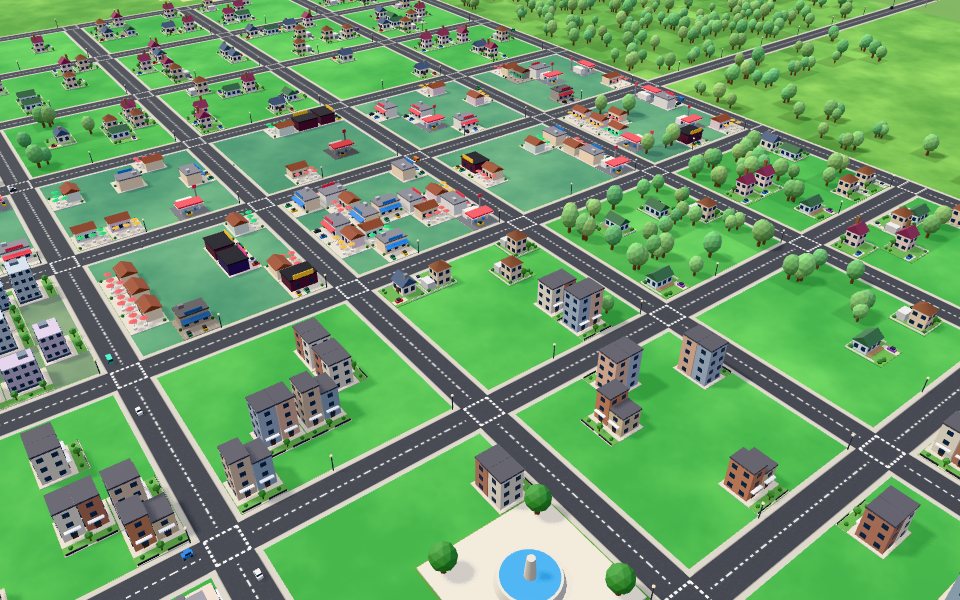
Metro Planner 3D is a city builder that runs in your browser. You start with an empty valley, a river, forests and a highway link to the outside world. Draw roads, then paint residential, commercial, industrial and office zones beside them and watch family houses, corner stores, cafes, gas stations, cinemas, farms, sawmills, factories and offices appear when there is demand for them, each on its own lot with driveways, gardens and parked cars. Citizens need jobs and education, industry makes goods that shops sell, and spare goods are exported along the highway while cars, delivery trucks, buses and pedestrians fill the streets. Every building needs electricity and water, which reach it through the road network from your power plants and water pumps, so a growing city keeps asking for more capacity. Police, fire stations, clinics, schools and parks raise happiness and land value, and that makes small houses grow into townhouses and apartment towers, and corner shops into office blocks and glass towers. Industry brings jobs but also smoke and pollution, so keep it away from homes. Balance the budget with four tax rates, service funding sliders and loans, watch income and upkeep every month, and reach population milestones to unlock new buildings and cash grants. Cars drive between homes and jobs, factories smoke, windows and street lights glow at night, and colour-coded views show power, water, land value, pollution, happiness and service coverage. Your city saves on your device automatically.
How to play
Pick Roads in the toolbar and drag on the ground to draw a road from the highway.
Pick Zones, choose Residential, Commercial, Industrial or Office and drag boxes beside your roads.
Build a coal power plant and a water pump on the river bank, connected by road, so buildings get power and water.
Watch the demand bars at the top: green for homes, blue for commerce, yellow for industry, purple for offices. Zone more of whatever is in demand.
Add parks, police, fire stations, clinics and schools as you unlock them to raise happiness and land value.
Open the budget to set taxes, fund each service and take loans, and use the speed buttons to pause or fast forward.
Tips
Start small: one road off the highway, a few zones on both sides, a power plant and a pump.
Keep industry downwind and away from homes, pollution makes residents unhappy.
Put parks between homes; higher land value lets houses grow into apartments.
Use the Electricity and Water views to find buildings without supply.
Taxes of 8 to 11 percent keep demand healthy; above 11 people get unhappy.
The complete Metro Planner 3D guide
This is the complete guide to Metro Planner 3D on Xons Play: what the game is, how the controls work, a visual walkthrough with real screenshots, strategy from beginner to advanced, the mistakes most players make and how to avoid them. Read it from top to bottom before your first game, or jump to the section you need.
At a glance
Players1 player
GenreCasual
Difficulty Medium
Typical session20 minutes to many hours
Key skillsPlanning, budgeting, systems thinking
GoalBeat your best score
Works onPhone, tablet, PC
PriceFree, no download
Visual guide to Metro Planner 3D
How a game works, step by step
1
Pick Roads in the toolbar and drag on the ground to draw a road from the highway.
2
Pick Zones, choose Residential, Commercial, Industrial or Office and drag boxes beside your roads.
3
Build a coal power plant and a water pump on the river bank, connected by road, so buildings get power and water.
4
Watch the demand bars at the top: green for homes, blue for commerce, yellow for industry, purple for offices. Zone more of whatever is in demand.
5
Add parks, police, fire stations, clinics and schools as you unlock them to raise happiness and land value.
6
Open the budget to set taxes, fund each service and take loans, and use the speed buttons to pause or fast forward.
Controls diagram
Touch screen
One finger in SelectMove the camera
Two fingersPinch to zoom, twist to rotate
Camera buttonsZoom and rotate with the buttons on the right
Mouse
Left drag with a toolDraw roads or paint zones
Left clickPlace a building, bulldoze or select
Left drag in SelectMove the camera
Right dragRotate and tilt the camera
Mouse wheelZoom
Keyboard
←↑↓→Move the camera
QERotate the camera
ZXZoom in and out
SpacePause or resume
EscBack to Select
Controls for Metro Planner 3D on phones, tablets and computers.
Why people love Metro Planner 3D
Casual games are about fun without commitment. Metro Planner 3D can be understood in seconds and enjoyed in a minute, yet it still rewards attention and good decisions. It is the kind of game you can play with a cup of tea, pass to a friend, or use to reset your mind between tasks. The light rules make it welcoming for every age, and the short rounds mean it never outstays its welcome.
The objective
Grow your city from an empty valley to a Metropolis of 20,000 people without going broke. Each population milestone pays a cash grant and unlocks new buildings. There is no time limit, so you can build at your own pace.
Background: where Metro Planner 3D comes from
Metro Planner 3D is an original Xons Play city builder. City-building games have been popular for decades because they turn town planning into a satisfying loop: lay out streets, decide where people live and work, keep the lights and taps on, and watch a place come alive. We built our own take for the browser with procedural 3D buildings, a road network that carries electricity and water, and a day and night cycle.
Controls explained
Device
Input
What it does
Mouse
Left drag with a tool
Draw roads or paint zones
Mouse
Left click
Place a building, bulldoze or select
Mouse
Left drag in Select
Move the camera
Mouse
Right drag
Rotate and tilt the camera
Mouse
Mouse wheel
Zoom
Keyboard
WASD or arrow keys
Move the camera
Keyboard
Q and E
Rotate the camera
Keyboard
Z and X
Zoom in and out
Keyboard
Space
Pause or resume
Keyboard
Esc
Back to Select
Touch
One finger in Select
Move the camera
Touch
Two fingers
Pinch to zoom, twist to rotate
Touch
Camera buttons
Zoom and rotate with the buttons on the right
The controls are the same on every level and in every mode, so once they feel natural you can focus fully on the game. Keyboard players get the most precise control, while touch players get large, thumb-friendly buttons.
Your first game of Metro Planner 3D
Press the Play button under the game title. Metro Planner 3D loads in a few seconds and starts in full screen on phones.
Step 1. Pick Roads in the toolbar and drag on the ground to draw a road from the highway. Take your time on the first attempt and get a feel for how the game responds.
Step 2. Pick Zones, choose Residential, Commercial, Industrial or Office and drag boxes beside your roads.
Step 3. Build a coal power plant and a water pump on the river bank, connected by road, so buildings get power and water.
Step 4. Watch the demand bars at the top: green for homes, blue for commerce, yellow for industry, purple for offices. Zone more of whatever is in demand.
Step 5. Add parks, police, fire stations, clinics and schools as you unlock them to raise happiness and land value.
Step 6. Open the budget to set taxes, fund each service and take loans, and use the speed buttons to pause or fast forward. That is the whole loop. Every game of Metro Planner 3D follows this pattern, with new situations each time.
On a keyboard you can use WASD or arrow keys to move the camera, Q and E to rotate the camera, Z and X to zoom in and out, Space to pause or resume, Esc to back to select. Remember the objective: Grow your city from an empty valley to a Metropolis of 20,000 people without going broke. Once that is clear, every decision becomes easier, because you can ask whether a move brings you closer to it.
Metro Planner 3D strategy
Grow from the highway
Only roads connected to the highway bring new residents and businesses. Start your first street at the end of the highway and branch out from there, so every district stays connected.
Follow the demand bars
The four bars at the top show what the city wants: green for homes, blue for commerce, yellow for industry and purple for offices. Zone more of the type with the tallest bar and less of the type that is falling below the line.
Keep power and water ahead of growth
Electricity and water travel through the road network, and each plant or pump has a fixed capacity. Check the stats panel: when usage gets close to capacity, build another plant or pump before buildings go dark and get abandoned.
Separate industry from homes
Factories bring jobs but also smoke. Pollution lowers land value and happiness nearby, so put industry on the far side of a road or a park belt, not next to houses.
Raise land value to grow upward
Houses become townhouses when land value and happiness are high, and apartments once you have schools and reach Small city. Parks, plazas and services within reach all lift land value.
Give people jobs
Every resident looks for work. Industry and shops hire anyone, offices want educated workers. Watch the Jobless figure at the top: above about 10 percent, zone more workplaces before more homes.
Educate for offices
Residents near a school slowly become educated, and a university works even faster. Educated citizens fill office jobs, let apartments grow and push office demand up.
Make your own goods
Factories, farms and forestry make goods that your shops sell. If shops run short they import goods, which costs money, and surplus goods are exported down the highway for profit.
Tune funding and borrow wisely
The budget panel has a funding slider for every service. Extra funding stretches coverage and output but costs more upkeep. A loan can pay for a big project, but the monthly payments include interest.
Mind the monthly budget
Income and upkeep are settled every 30 days. Roads and services cost money every month, so build services where they cover the most buildings, and keep taxes between 8 and 11 percent.
A closer look at Metro Planner 3D
The heart of Metro Planner is the road network. Every building is attached to the road beside it, and roads link it to the highway, to the power plant and to the water pump. That means one well-placed road can bring an entire district online, and one missing tile can leave a block in the dark. Use the Electricity and Water views to see exactly which buildings are supplied: green means supplied, red means cut off. As the city grows, the most satisfying moments come from upgrades. A street of small houses near a park, a school and a clinic slowly turns into townhouses and then into apartment towers, and the shops across the road become office blocks and glass towers. At night the windows light up and the street lights come on, which is the best time to look at what you have built.
Common mistakes and how to fix them
Zoning far from roads
Zones grow only within a few tiles of a road. Paint zones in strips beside streets.
Forgetting the road link
A power plant or pump with no road next to it supplies nothing. Every service needs a road on one side.
Over-zoning one type
Too much of one zone leaves lots empty. Match zoning to the demand bars.
High taxes
Taxes above 11 percent lower demand and happiness, and unhappy buildings are eventually abandoned.
Levels, difficulty and progression
Progress comes from population milestones rather than levels: Village at 300 people unlocks police, fire stations and clinics; Town at 1,000 unlocks office zones, schools, wind turbines and water towers; Small city at 2,500 unlocks high density buildings, solar farms and plazas; City at 5,000 unlocks the university and hospital and Big city at 10,000 the stadium. Metropolis at 20,000 people is the final rank. We rate Metro Planner 3D as medium (3 out of 5), with a typical session of 20 minutes to many hours.
What Metro Planner 3D trains
Metro Planner 3D is designed to be picked up at any time and enjoyed in 20 minutes to many hours. It is light on rules but still rewards planning, budgeting, systems thinking, which makes it a good match for players of all ages. Casual games are a pleasant way to rest your mind while still giving it something to do. Because rounds are short, you can play one round between tasks without losing track of time.
How to practise and improve
Improvement in Metro Planner 3D comes quickly with a little attention. Pick one idea from the tips on this page, use it for a few rounds and see what changes. Short, regular sessions are better than long ones.
Playing on phone, tablet and computer
Metro Planner 3D runs directly in your web browser on phones, tablets, laptops and desktop computers. There is nothing to install and no account needed. On a phone, the game adapts its controls to touch, with large buttons and swipe gestures sized for thumbs. On a computer, you can use the mouse and keyboard, which many players find more precise. Tablets give you the best of both: a big screen with touch controls. For the smoothest experience, close other heavy tabs, keep your browser up to date, and use the fullscreen button in the game bar. If you play on a phone with a small screen, turning it sideways usually gives you a wider view. The game saves your progress and best scores in your browser, so playing on the same device keeps your records.
Playing alone and sharing scores
Metro Planner 3D is a single-player game, which means you can play at your own pace whenever you like. Your best score and progress are saved on your device, so every session builds on the last. It also makes a fun challenge to share: play a round, tell your friends your score, and see who can beat it. Many families pass a tablet around and take turns, which turns a solo game into a group activity.
Goals for every level of player
Beginner
Learn the controls and the objective, and finish a full game of Metro Planner 3D without rushing. Start small: one road off the highway, a few zones on both sides, a power plant and a pump. Do not worry about winning yet; focus on understanding why things happen.
Intermediate
Start using the first two strategy ideas on this page: grow from the highway and follow the demand bars. Try to avoid the common mistakes listed above, and notice when you make them.
Advanced
Combine every idea: keep power and water ahead of growth and separate industry from homes. Chase a personal best you thought was out of reach, and think a step further ahead than your opponent.
Accessibility and comfort settings
Metro Planner 3D is designed to be comfortable for as many people as possible. Every button is large enough for touch, text uses high-contrast colours on a dark background, and important information is shown with both colour and shape or text, so the game stays readable for players with colour vision differences. Sound can be switched off with the speaker button at any time, and no part of the game depends on hearing. The fullscreen button removes distractions and makes everything larger on small screens. If you prefer playing with one hand, the touch controls work with a single thumb, and most actions can also be done with a mouse or keyboard alone.
Tracking your progress
Your progress in Metro Planner 3D is saved automatically in your browser. Your best score appears under the title on the game page, and level-based games keep your stars and unlocked levels. Because records live on this device, clearing your browser data or using private browsing will reset them. To track improvement, note your best score each week and compare. Small, steady increases are a sign that the strategies on this page are working.
Glossary
Zone
Land marked for homes, shops or industry, where buildings grow by themselves.
Demand
How much the city wants more of each zone type.
Land value
How desirable a tile is; raised by parks and services, lowered by pollution.
Road network
Connected roads; power and water flow along them.
Milestone
A population target that unlocks buildings and pays a grant.
Education
The share of residents who went to school or university; offices need educated workers.
Unemployment
Workers with no job. High unemployment makes residents unhappy and lowers demand for homes.
Goods
Products made by industry and sold by shops; extra goods are exported, missing goods are imported.
Service funding
A budget slider from 50 to 150 percent that changes service cost, output and reach.
Abandoned building
A building left empty after a long time without power, water or happiness.
Fair play and healthy habits
We want Metro Planner 3D to be a friendly place to play. Be kind in chat, accept wins and losses gracefully, and remember that there is a real person behind every seat in online games. Take regular breaks, especially during long sessions: rest your eyes for a minute every half hour and stretch your hands. Parents can play alongside younger children to explain the rules and keep sessions to a sensible length. Xons Play does not sell in-game items or loot boxes, so every player has the same chance and nothing can be bought to win. If you ever see behaviour that spoils the game for others, contact us through the Contact page.
If you like Metro Planner 3D, try these
Players who enjoy Metro Planner 3D often like these games too. Each one is free and runs in the same browser window.
Rock Paper Scissors: Pick rock, paper or scissors at the same time. First to five wins. It is another casual game, so the skills you build in Metro Planner 3D carry over.
Pig Dice: Roll as long as you dare, but a 1 wipes out your turn. It is another casual game, so the skills you build in Metro Planner 3D carry over.
Nim: Take sticks from a row. Whoever takes the last stick wins. It is another casual game, so the skills you build in Metro Planner 3D carry over.
Tower Stack: One tap, one block. Perfect timing keeps your tower wide and your streak alive. It is another casual game, so the skills you build in Metro Planner 3D carry over.
More questions about Metro Planner 3D
Is Metro Planner 3D free to play?
Yes. Metro Planner 3D is completely free on Xons Play, with no download, no account and no in-game purchases. The site is supported by advertising.
How long does a game of Metro Planner 3D take?
A typical session lasts 20 minutes to many hours. You can stop at any time and your best score stays saved on this device.
Is Metro Planner 3D hard?
We rate it medium, 3 out of 5. The basics are quick to learn, and there is plenty of depth to explore.
Can children play Metro Planner 3D?
Yes. Metro Planner 3D has no violent or adult content. It is a single-player game, so there is no chat with strangers.
Does Metro Planner 3D work offline?
The page needs an internet connection to load. Once a game has started, single-player games keep running even if the connection drops briefly.
Metro Planner 3D FAQ
Do I need to download anything?
No. Metro Planner 3D runs in your browser on computers, tablets and phones.
Is my city saved?
Yes. It saves on your device every 20 seconds and when you leave, and you can start a new city from the menu.
Why are my buildings not growing?
Zones grow only next to roads that connect to the highway, and only when there is demand. Check the demand bars and make sure there is power and water.
How do I unlock more buildings?
Reach population milestones: 300 people unlock police, fire and health, 1,000 unlock schools, 2,500 unlock high density and more.
We use cookies and similar technologies to keep you signed in to games, measure traffic and show ads (including personalised ads by Google). See our Cookie Policy.