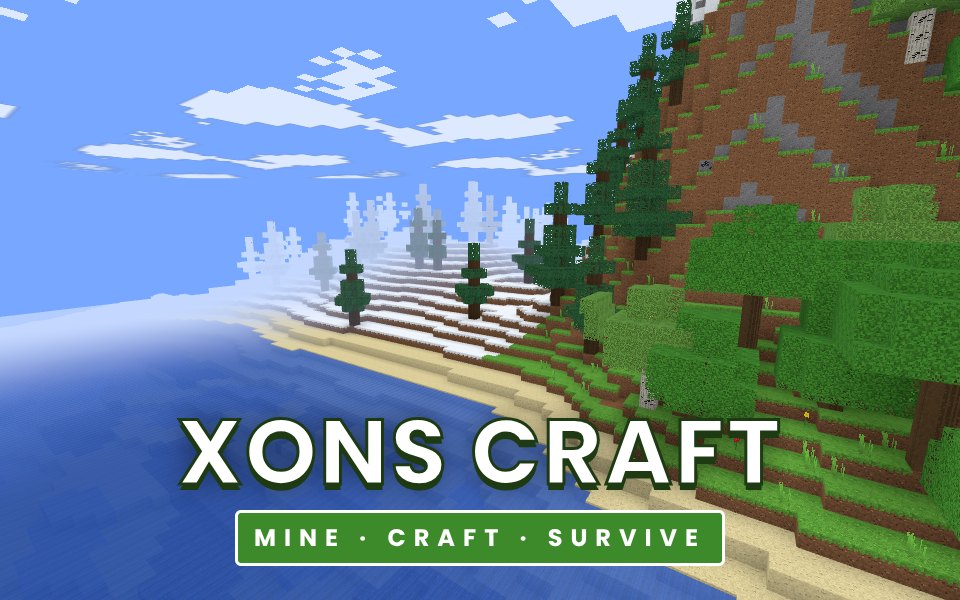
Xons Craft is a single-player block sandbox that runs in your browser. Every world is generated from a seed and goes on as far as you can walk: plains, forests, birch woods, deserts with cactus, snowy taiga, tall mountains and oceans. Underground there are winding caves and large caverns, with coal, iron, gold and rare diamonds, and lakes of lava near the bottom of the world. Light works like the real thing: caves are dark unless you bring torches, and sunlight fades at dusk. Start with your bare hands, punch a tree for wood, make planks and a crafting table, and work up from wooden tools to stone, iron and diamond. Smelt ore in a furnace, store your finds in chests and build anything you can imagine. In survival you have health, hunger and air to manage, fall damage is real, and when night falls zombies, skeleton archers and spiders come out of the dark. Creative mode gives you every block and lets you fly. Worlds are saved on your device so you can come back to them any time.
How to play
Create a world, choose Survival or Creative and a difficulty, and press Create and play.
On a computer click the game to look around with the mouse. Move with WASD, jump with Space, sneak with Shift and sprint with Ctrl or a double tap of W.
Hold the left mouse button on a block to break it, and right click to place the block in your hand or use a crafting table, furnace or chest.
Press E to open your inventory and craft. Four planks make a crafting table, which gives you the full 3 by 3 crafting grid.
On phones use the left stick to move, drag to look, tap to place or use, and hold on a block to break it.
Tips
Your first night is the most dangerous. Build a small shelter and light it with torches before the sun sets.
Coal and a stick make four torches. Hostile mobs only appear in the dark, so light up your home and your mines.
Stone tools mine iron ore, iron tools mine gold and diamond. Smelt iron ore in a furnace to get ingots.
Eat before your hunger bar gets low: you only heal when you are well fed, and you cannot sprint when you are starving.
Sand and gravel fall when the block under them is removed. Never dig straight down: you may fall into a cave or lava.
The complete Xons Craft guide
This is the complete guide to Xons Craft on Xons Play: what the game is, how the controls work, a visual walkthrough with real screenshots, strategy from beginner to advanced, the mistakes most players make and how to avoid them. Read it from top to bottom before your first game, or jump to the section you need.
Create a world, choose Survival or Creative and a difficulty, and press Create and play.
2
On a computer click the game to look around with the mouse. Move with WASD, jump with Space, sneak with Shift and sprint with Ctrl or a double tap of W.
3
Hold the left mouse button on a block to break it, and right click to place the block in your hand or use a crafting table, furnace or chest.
4
Press E to open your inventory and craft. Four planks make a crafting table, which gives you the full 3 by 3 crafting grid.
5
On phones use the left stick to move, drag to look, tap to place or use, and hold on a block to break it.
Controls diagram
Touch screen
Stick, drag, tap and holdMove, look, place and break on phones
Mouse
Left mouse (hold)Break a block or attack
Right mousePlace, use a table, furnace or chest, eat
Keyboard
WASDMove
SpaceJump, swim up, double tap to fly in creative
ShiftSneak (you will not fall off edges)
WSprint
EInventory and crafting
1 to 9 or wheelChoose a hotbar slot
QDrop one item (Ctrl+Q: the whole stack)
Controls for Xons Craft on phones, tablets and computers.
Why people love Xons Craft
Action games make your heart beat faster. Xons Craft throws something new at you every few seconds, and getting through a tough moment feels genuinely exciting. Failing is quick and restarting is instant, so the game keeps you in the flow. Over time you notice yourself reacting faster and reading situations earlier, which is a satisfying kind of progress that you can feel in your hands.
The objective
There is no final level. Your goals are the ones you set: survive as many days as you can, collect diamonds, build a base, or explore. In Hardcore you have a single life, and dying locks the world.
Background: where Xons Craft comes from
Xons Craft is our take on the block sandbox: an endless world you can take apart and rebuild one block at a time. It is a survival game first. You start with nothing, the first night arrives in about ten minutes, and every tool you hold has to be earned from the world around you. This guide covers your first day, the tool ladder from wood to diamond, how light and mobs work, and how to stay alive on Hard.
Controls explained
Device
Input
What it does
Keyboard
W A S D
Move
Keyboard
Space
Jump, swim up, double tap to fly in creative
Keyboard
Shift
Sneak (you will not fall off edges)
Keyboard
Ctrl or double tap W
Sprint
Mouse
Left mouse (hold)
Break a block or attack
Mouse
Right mouse
Place, use a table, furnace or chest, eat
Keyboard
E
Inventory and crafting
Keyboard
1 to 9 or wheel
Choose a hotbar slot
Keyboard
Q
Drop one item (Ctrl+Q: the whole stack)
Touch
Stick, drag, tap and hold
Move, look, place and break on phones
The controls are the same on every level and in every mode, so once they feel natural you can focus fully on the game. Keyboard players get the most precise control, while touch players get large, thumb-friendly buttons.
Your first game of Xons Craft
Press the Play button under the game title. Xons Craft loads in a few seconds and starts in full screen on phones.
Step 1. Create a world, choose Survival or Creative and a difficulty, and press Create and play. Take your time on the first attempt and get a feel for how the game responds.
Step 2. On a computer click the game to look around with the mouse. Move with WASD, jump with Space, sneak with Shift and sprint with Ctrl or a double tap of W.
Step 3. Hold the left mouse button on a block to break it, and right click to place the block in your hand or use a crafting table, furnace or chest.
Step 4. Press E to open your inventory and craft. Four planks make a crafting table, which gives you the full 3 by 3 crafting grid.
Step 5. On phones use the left stick to move, drag to look, tap to place or use, and hold on a block to break it. That is the whole loop. Every game of Xons Craft follows this pattern, with new situations each time.
On a keyboard you can use W A S D to move, Space to jump, swim up, double tap to fly in creative, Shift to sneak (you will not fall off edges), Ctrl or double tap W to sprint, E to inventory and crafting, 1 to 9 or wheel to choose a hotbar slot, Q to drop one item (ctrl+q: the whole stack). Remember the objective: There is no final level. Once that is clear, every decision becomes easier, because you can ask whether a move brings you closer to it.
Xons Craft strategy
Your first ten minutes
Punch a tree to collect logs (about three seconds each by hand). Open your inventory and turn logs into planks, then four planks into a crafting table. Place the table, use it, and make sticks and a wooden pickaxe. Mine about a dozen cobblestone and upgrade straight away to stone tools, which mine more than twice as fast.
Before the first night
Find coal: it shows as black specks in exposed stone on hillsides and in cave walls. Coal on top of a stick makes four torches. Dig into a hill or build a small hut, close the doorway with a block, and place torches inside. Monsters only appear in darkness, so a well-lit room is a safe room.
The tool ladder
Wooden pickaxes mine stone and coal. Stone pickaxes mine iron ore. Iron pickaxes mine gold and diamond ore. Diamond pickaxes are the only tools that can mine obsidian. Smelt iron and gold ore in a furnace with coal or charcoal to get ingots; smelting takes ten seconds per item.
Light and mining safely
Caves are pitch dark without torches, and lava pools glow near the bottom of the world. Place a torch every eight to ten blocks as you explore, both to see and to stop monsters appearing behind you. Never dig straight down: you could drop into a cavern or a lava lake.
Food and health
You heal only while your hunger bar is nearly full. Animals drop raw meat; cook it in a furnace for far more nourishment. Apples drop from oak leaves, and grass sometimes drops wheat for bread. Raw chicken and rotten flesh can make you sick, which drains hunger quickly.
A closer look at Xons Craft
The world is built from chunks of 16 by 16 by 128 blocks that are generated in the background as you move. Light is calculated block by block, from the sun and from torches, lava and lamps, with smooth shading and soft shadows in corners.
Common mistakes and how to fix them
Fighting at night in the open
Skeleton archers keep their distance and zombies arrive in groups. On Hard, two or three hits from a zombie halve your health. Stay inside until morning, when the sun burns zombies and skeletons.
Falling
Falls of more than three blocks hurt, and long falls kill. Sneak along edges and keep a stack of blocks to pillar down safely.
Breaking ore with the wrong pickaxe
Iron, gold and diamond ore drop nothing if your pickaxe is too weak. Check the tool ladder before you mine a diamond.
Levels, difficulty and progression
Worlds are generated from a seed: type the same seed on another device and you get the same terrain, caves and ores. Changes you make are saved in your browser and loaded when you return. The view distance setting on the world menu controls how far you can see; use a short distance on older phones for a smooth frame rate. We rate Xons Craft as medium (3 out of 5), with a typical session of Endless, saved on your device.
What Xons Craft trains
Fast and full of surprises, Xons Craft keeps you on your toes. Each run of Endless, saved on your device is a test of planning, building, survival, exploration, and every mistake shows you something new. The thrill of finally getting past a tricky moment is what makes action games so rewarding, and why people keep coming back for one more try.
How to practise and improve
In Xons Craft, memory is as important as reflexes. Notice where things went wrong and plan for them on the next attempt. Slow, controlled movement usually beats rushing. If you are stuck, try a different approach for a few attempts, such as waiting longer before a jump or taking a different route.
Playing on phone, tablet and computer
You can play Xons Craft on almost any modern device. Chrome, Safari, Edge and Firefox all work, on Android, iPhone, iPad, Windows, macOS and Linux. Touch controls appear automatically on phones and tablets, and keyboard shortcuts work on computers. If the game ever feels slow, try closing other tabs or switching to the flat board view where available, which uses less graphics power. Your settings and progress are stored in your browser on this device, so private browsing modes will forget them when you close the window.
Playing alone and sharing scores
Because Xons Craft is played alone, it is perfect for short breaks. There is no waiting for other players and no pressure. Set yourself small goals, such as beating your best score or clearing a few more levels than yesterday. If you enjoy competition, compare scores with friends and challenge them to beat yours on their own device.
Goals for every level of player
Beginner
Learn the controls and the objective, and finish a full game of Xons Craft without rushing. Your first night is the most dangerous. Build a small shelter and light it with torches before the sun sets. Do not worry about winning yet; focus on understanding why things happen.
Intermediate
Start using the first two strategy ideas on this page: your first ten minutes and before the first night. Try to avoid the common mistakes listed above, and notice when you make them.
Advanced
Combine every idea: the tool ladder and light and mining safely. Chase a personal best you thought was out of reach, and think a step further ahead than your opponent.
Accessibility and comfort settings
We have tried to keep Xons Craft easy on the eyes and hands. The interface uses clear, large text and strong contrast, colours are never the only way information is shown, and animations stay short. You can mute all sound from the game bar, switch to fullscreen to make the board bigger, and on board games use the flat view for a simple top-down layout. Keyboard and mouse controls are available on computers for players who find touch screens tiring, and there are no time-critical menus.
Tracking your progress
Xons Craft remembers your best results on this device, so every session starts where the last one ended. A good habit is to set a target before you play, such as beating your best by ten percent, and to stop after reaching it. If you play on several devices, each keeps its own records. Progress stays private to you: nothing is shared unless you choose to tell friends your score.
Glossary
Seed
The number or word a world is generated from.
Smelting
Turning ore, sand or raw food into ingots, glass or cooked food in a furnace.
Hotbar
The nine slots at the bottom of the screen that you can use without opening the inventory.
Hardcore
A survival world with a single life.
Blast Barrel
A block that explodes a few seconds after you use it. It destroys blocks nearby and can hurt you.
Fair play and healthy habits
Good sportsmanship makes Xons Craft more fun for everyone. Congratulate opponents on a good game, avoid leaving mid-match, and keep chat friendly. For healthy play, set a time limit before you start, sit comfortably with the screen at eye level and take breaks between sessions. There are no purchases in Xons Craft, so success comes only from skill and practice. Families can use the game as shared time together, talking about decisions and celebrating good moves.
If you like Xons Craft, try these
Players who enjoy Xons Craft often like these games too. Each one is free and runs in the same browser window.
Sneaky Crew: Up to 10 players, three maps and a Sneak hiding among the crew. Do tasks, find frozen crewmates and vote the Sneak out. It is another action game, so the skills you build in Xons Craft carry over.
Troll Squad: A co-op troll platformer for 2 to 4 players: 500 levels of shared doors, head-stacking, plot twists and squad wipes. It is another action game, so the skills you build in Xons Craft carry over.
Troll Party: A chaotic 2D troll race for up to 5 players: 500 levels of fake floors, runaway doors, prank buttons and plot twists. It is another action game, so the skills you build in Xons Craft carry over.
Rail Rush: Race from a sunlit city through the fires of Hell and up into Heaven, dodging trains all the way. It is another action game, so the skills you build in Xons Craft carry over.
More questions about Xons Craft
Is Xons Craft free to play?
Yes. Xons Craft is completely free on Xons Play, with no download, no account and no in-game purchases. The site is supported by advertising.
How long does a game of Xons Craft take?
A typical session lasts Endless, saved on your device. You can stop at any time and your best score stays saved on this device.
Is Xons Craft hard?
We rate it medium, 3 out of 5. The basics are quick to learn, and there is plenty of depth to explore.
Can children play Xons Craft?
Yes. Xons Craft has no violent or adult content. It is a single-player game, so there is no chat with strangers.
Does Xons Craft work offline?
The page needs an internet connection to load. Once a game has started, single-player games keep running even if the connection drops briefly.
Xons Craft FAQ
Is this game free?
Yes. Xons Craft is free to play in your browser with no download or account.
Are my worlds saved?
Yes. Worlds, your inventory and every change you make are saved in your browser on this device.
Can I play on a phone?
Yes. It has touch controls with a movement stick, drag to look and buttons for jumping, sneaking and your inventory. Use a short view distance on older phones.
What is the difference between the difficulties?
On Hard, monsters deal more damage, have more health and move faster, and hunger drains faster. Hardcore is Hard with one life: when you die the world is locked.
How do I fly?
In a Creative world, double tap jump to start and stop flying. Hold jump to rise and sneak to go down.
We use cookies and similar technologies to keep you signed in to games, measure traffic and show ads (including personalised ads by Google). See our Cookie Policy.