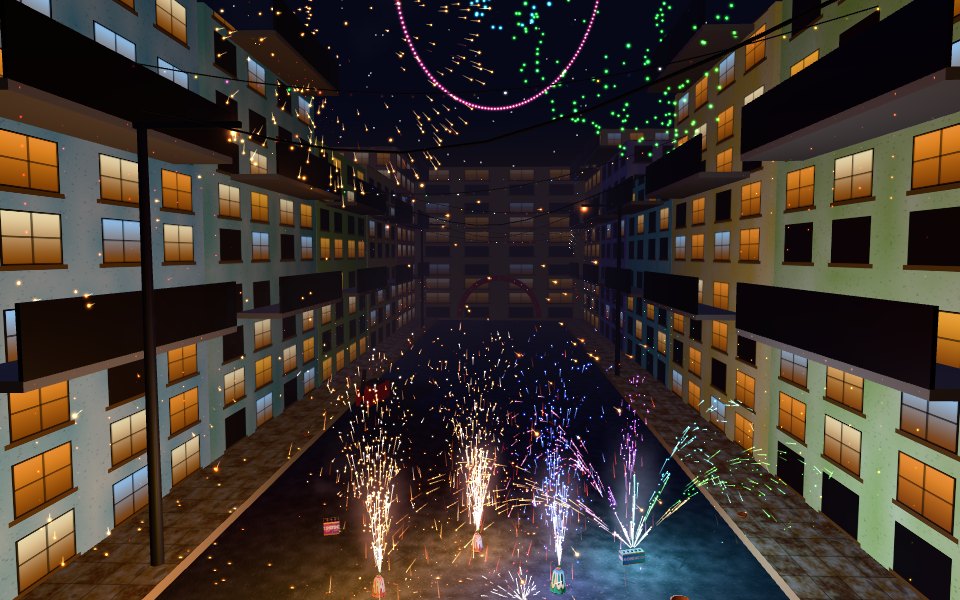
Firecracker Simulator is a virtual Diwali night you can enjoy safely on any screen. Pick from 33 kinds of crackers and place them wherever you like: Anar flower pots and colour pots, the Peacock fan, Chakri ground spinners, Phuljhadi sparklers, colour pencils and snake tablets on the ground; Hawai rockets in a bottle, whistling Seeti rockets, the flying Titli and 12 and 30 shot sky cakes in the air; and eleven kinds of bombs for big bangs: Bijli, Chocolate, Laxmi, Bullet, Double Sound, Sutli, Atom, Hydrogen and the giant Thunder King, plus the 1000 wala and 10000 wala chains. The bigger the bomb, the bigger the fireball, shockwave, dust wave and smoke, with the deep boom echoing off nearby walls and buildings. Then there is the Mega group: ten giant fantasy bombs, far beyond anything real, such as Dhamaka 5000, Toofan with its storm of lightning, Bhookamp that shakes the ground and splits it open, Jwalamukhi that erupts like a volcano, a Meteor Strike that falls from the sky, Brahmastra, the Galaxy Bomb, Mega Atom with its mushroom cloud and the Maha Bomb that does it all. They crack the ground and the walls, shatter windows, leave fires burning and even knock out the lights for a moment. Light them one at a time or press Light all and watch the show. Every effect is built in real time: glowing sparks with trails, smoke lit by the flames, red cracker paper littering the ground, shockwaves, scorch marks and sky shells that burst into peony, willow, ring, crossette, palm, glitter and crackling patterns. Bombs push, break and set off whatever is nearby, so you can set up chain reactions with clay matkas, glass bottles, watermelons, crates, tin cans and buckets. Play in a haveli courtyard with rangoli and diyas, a mohalla street hung with lights, a city rooftop, a mela ground with a big wheel, or a river ghat with floating diyas, with synthesised sound and phone vibration on every bang.
How to play
Choose a group at the bottom (Ground, Sky, Bombs, Targets) and pick a cracker.
Tap or click the ground to place it. Place as many as you like, anywhere in the area.
Tap a cracker to light its fuse, or press Light all to light everything in order.
Turn on Auto to light crackers the moment you place them, Slow to watch in slow motion, and Look up to follow rockets into the sky.
Drag to look around, pinch or scroll to zoom, and use two fingers or right drag to move.
Tap the place name at the top to switch between the courtyard, street, rooftop, mela ground and river ghat.
Tips
Put targets next to a Sutli or Atom bomb to send them flying or smash them.
A bomb going off sets off nearby unlit crackers, so build chain reactions.
Lay a 1000 wala, then press Light all for a long rattling finale.
Sky shots look best on the rooftop and the river ghat, where the sky is wide open.
Use Clear to sweep away the paper, smoke marks and broken pieces and start again.
The complete Firecracker Simulator guide
This is the complete guide to Firecracker Simulator on Xons Play: what the game is, how the controls work, a visual walkthrough with real screenshots, strategy from beginner to advanced, the mistakes most players make and how to avoid them. Read it from top to bottom before your first game, or jump to the section you need.
At a glance
Players1 player
GenreCasual
Difficulty Very easy
Typical session2 minutes to an hour
Key skillsCreativity, timing, fun
GoalBeat your best score
Works onPhone, tablet, PC
PriceFree, no download
Visual guide to Firecracker Simulator
How a game works, step by step
1
Choose a group at the bottom (Ground, Sky, Bombs, Targets) and pick a cracker.
2
Tap or click the ground to place it. Place as many as you like, anywhere in the area.
3
Tap a cracker to light its fuse, or press Light all to light everything in order.
4
Turn on Auto to light crackers the moment you place them, Slow to watch in slow motion, and Look up to follow rockets into the sky.
5
Drag to look around, pinch or scroll to zoom, and use two fingers or right drag to move.
6
Tap the place name at the top to switch between the courtyard, street, rooftop, mela ground and river ghat.
Controls diagram
Touch screen
Tap the groundPlace the selected item
Tap a crackerLight it
Drag, pinch, two fingersRotate, zoom and move the view
Light all buttonLight every placed cracker in turn
Mouse
Left click on the groundPlace the selected cracker or target
Left click on a crackerLight its fuse
Left dragRotate the view
Mouse wheelZoom in and out
Right dragMove the view
Keyboard
No keyboard needed, the mouse or touch does everything.
Controls for Firecracker Simulator on phones, tablets and computers.
Why people love Firecracker Simulator
Casual games are about fun without commitment. Firecracker Simulator can be understood in seconds and enjoyed in a minute, yet it still rewards attention and good decisions. It is the kind of game you can play with a cup of tea, pass to a friend, or use to reset your mind between tasks. The light rules make it welcoming for every age, and the short rounds mean it never outstays its welcome.
The objective
There is no score to chase and no time limit. Place as many crackers and targets as you like, light them one by one or all together, and set up the show you want. The counters at the top show how many crackers you have lit and how many bangs you have set off.
Background: where Firecracker Simulator comes from
Firecracker Simulator is an original Xons Play game made for the festival season. Bursting crackers is a big part of Diwali, weddings and new year nights across India, from the gentle glow of an anar to the chest-thumping boom of a sutli bomb. We built a safe, virtual version for the browser so anyone can enjoy the show on a phone or computer: no smoke in the house, no burnt fingers and no mess to sweep up afterwards. Every spark, flame, cloud of smoke and bang is generated live by the game.
Controls explained
Device
Input
What it does
Mouse
Left click on the ground
Place the selected cracker or target
Mouse
Left click on a cracker
Light its fuse
Mouse
Left drag
Rotate the view
Mouse
Mouse wheel
Zoom in and out
Mouse
Right drag
Move the view
Touch
Tap the ground
Place the selected item
Touch
Tap a cracker
Light it
Touch
Drag, pinch, two fingers
Rotate, zoom and move the view
Touch
Light all button
Light every placed cracker in turn
The controls are the same on every level and in every mode, so once they feel natural you can focus fully on the game. Touch and mouse work identically, so switching between your phone and computer feels natural.
Your first game of Firecracker Simulator
Press the Play button under the game title. Firecracker Simulator loads in a few seconds and starts in full screen on phones.
Step 1. Choose a group at the bottom (Ground, Sky, Bombs, Targets) and pick a cracker. Take your time on the first attempt and get a feel for how the game responds.
Step 2. Tap or click the ground to place it. Place as many as you like, anywhere in the area.
Step 3. Tap a cracker to light its fuse, or press Light all to light everything in order.
Step 4. Turn on Auto to light crackers the moment you place them, Slow to watch in slow motion, and Look up to follow rockets into the sky.
Step 5. Drag to look around, pinch or scroll to zoom, and use two fingers or right drag to move.
Step 6. Tap the place name at the top to switch between the courtyard, street, rooftop, mela ground and river ghat. That is the whole loop. Every game of Firecracker Simulator follows this pattern, with new situations each time.
Remember the objective: There is no score to chase and no time limit. Once that is clear, every decision becomes easier, because you can ask whether a move brings you closer to it.
Firecracker Simulator strategy
Build a show, then press Light all
Light all sets off every unlit cracker one after another, in the order you placed them. Place ground fountains first, sky shots next and bombs last for a show that builds to a big finish.
Use bombs to start chain reactions
A bang lights any unlit cracker close to it and pushes things away. Put a ring of Bijli bombs around a Sutli bomb and light one of them to watch the whole ring go.
Set targets around big bombs
Matkas, bottles, crates and watermelons break when a big enough blast is close. Tin cans and the steel balti never break, they fly and clang instead.
Pick the right place
The narrow street echoes and makes every bang sound bigger. The rooftop and the river ghat have the widest sky for rockets and sky shots, and the mela ground has the most room.
Watch in slow motion
Slow mode runs everything at a third of the speed, which is great for seeing how a shell bursts into stars or how a sutli bomb throws its paper.
A closer look at Firecracker Simulator
Each effect is built from real-time particles rather than videos. Sparks glow and leave trails, cool from white to orange to red as they fade, and bounce off the ground and walls. Smoke drifts with the wind and picks up the colour of the fire beside it. Big bombs add a fireball, a ring of dust, scorch marks and a rain of red cracker paper that stays on the ground. All sound is created in the browser, with echoes that match the place you are in and a short muffled ringing after a huge blast close by. Real fireworks are dangerous: always follow local rules and keep children with an adult.
Common mistakes and how to fix them
Standing too close with the camera
The biggest bombs fill the screen with flash and shake the view. Zoom out before lighting a Hydrogen bomb or the Thunder King.
Placing crackers on top of each other
Crackers that are too close knock each other over. A fallen anar sprays sideways instead of up.
Forgetting about the fuse
Every cracker has a short fuse. Bigger bombs have longer fuses, so wait for the bang before tapping again.
Levels, difficulty and progression
The game has 33 crackers in four groups. Ground: Anar, Rangeen Anar, Mor Pankh peacock fan, Chakri, Phuljhadi sparkler, Colour Pencil and Saanp Goli snake tablet. Sky: Rocket, Seeti whistling rocket, Titli flying butterfly, Sky Shot 12 and Mega Shot 30. Bombs, from smallest to largest: Bijli, Chocolate, Laxmi, Bullet, Double Sound, Sutli, Atom, Hydrogen and Thunder King, plus the 1000 wala and 10000 wala chains. Mega: ten giant fantasy bombs, Dhamaka 5000, Toofan, Bahubali, Bhookamp, Jwalamukhi, Meteor Strike, Galaxy, Brahmastra, Mega Atom and Maha Bomb, which crack the ground and walls, shatter windows, start fires and cause a short blackout. There are also seven targets and five places: Haveli Courtyard, Mohalla Street, Rooftop, Mela Ground and River Ghat. We rate Firecracker Simulator as very easy (1 out of 5), with a typical session of 2 minutes to an hour.
What Firecracker Simulator trains
The charm of Firecracker Simulator is how quickly it gets going. You can understand it in seconds, and a round of 2 minutes to an hour still asks for creativity, timing, fun. That balance is why casual games are some of the most played in the world, and why they are a good choice for families and groups.
How to practise and improve
To get better at Firecracker Simulator, play a few rounds in a row and notice what works. Casual games reward small habits, such as waiting a moment before acting or watching for patterns. Keep it light and enjoyable; the best scores usually come when you are relaxed.
Playing on phone, tablet and computer
You can play Firecracker Simulator on almost any modern device. Chrome, Safari, Edge and Firefox all work, on Android, iPhone, iPad, Windows, macOS and Linux. Touch controls appear automatically on phones and tablets, and keyboard shortcuts work on computers. If the game ever feels slow, try closing other tabs or switching to the flat board view where available, which uses less graphics power. Your settings and progress are stored in your browser on this device, so private browsing modes will forget them when you close the window.
Playing alone and sharing scores
Because Firecracker Simulator is played alone, it is perfect for short breaks. There is no waiting for other players and no pressure. Set yourself small goals, such as beating your best score or clearing a few more levels than yesterday. If you enjoy competition, compare scores with friends and challenge them to beat yours on their own device.
Goals for every level of player
Beginner
Learn the controls and the objective, and finish a full game of Firecracker Simulator without rushing. Put targets next to a Sutli or Atom bomb to send them flying or smash them. Do not worry about winning yet; focus on understanding why things happen.
Intermediate
Start using the first two strategy ideas on this page: build a show, then press light all and use bombs to start chain reactions. Try to avoid the common mistakes listed above, and notice when you make them.
Advanced
Combine every idea: set targets around big bombs and pick the right place. Chase a personal best you thought was out of reach, and think a step further ahead than your opponent.
Accessibility and comfort settings
We have tried to keep Firecracker Simulator easy on the eyes and hands. The interface uses clear, large text and strong contrast, colours are never the only way information is shown, and animations stay short. You can mute all sound from the game bar, switch to fullscreen to make the board bigger, and on board games use the flat view for a simple top-down layout. Keyboard and mouse controls are available on computers for players who find touch screens tiring, and there are no time-critical menus.
Tracking your progress
Firecracker Simulator remembers your best results on this device, so every session starts where the last one ended. A good habit is to set a target before you play, such as beating your best by ten percent, and to stop after reaching it. If you play on several devices, each keeps its own records. Progress stays private to you: nothing is shared unless you choose to tell friends your score.
Glossary
Anar
A clay or paper cone that sprays a fountain of sparks upward.
Chakri
A coiled wheel that spins on the ground and throws a ring of sparks.
Phuljhadi
A hand sparkler that crackles with branching sparks.
Sutli bomb
A bomb wrapped tightly in twine, known for a very loud bang.
Ladi
A chain of small crackers that go off one after another, such as the 1000 wala.
Sky shot
A box of tubes that fires shells into the air one after another.
Fair play and healthy habits
Good sportsmanship makes Firecracker Simulator more fun for everyone. Congratulate opponents on a good game, avoid leaving mid-match, and keep chat friendly. For healthy play, set a time limit before you start, sit comfortably with the screen at eye level and take breaks between sessions. There are no purchases in Firecracker Simulator, so success comes only from skill and practice. Families can use the game as shared time together, talking about decisions and celebrating good moves.
If you like Firecracker Simulator, try these
Players who enjoy Firecracker Simulator often like these games too. Each one is free and runs in the same browser window.
Rock Paper Scissors: Pick rock, paper or scissors at the same time. First to five wins. It is another casual game, so the skills you build in Firecracker Simulator carry over.
Pig Dice: Roll as long as you dare, but a 1 wipes out your turn. It is another casual game, so the skills you build in Firecracker Simulator carry over.
Nim: Take sticks from a row. Whoever takes the last stick wins. It is another casual game, so the skills you build in Firecracker Simulator carry over.
Tower Stack: One tap, one block. Perfect timing keeps your tower wide and your streak alive. It is another casual game, so the skills you build in Firecracker Simulator carry over.
More questions about Firecracker Simulator
Is Firecracker Simulator free to play?
Yes. Firecracker Simulator is completely free on Xons Play, with no download, no account and no in-game purchases. The site is supported by advertising.
How long does a game of Firecracker Simulator take?
A typical session lasts 2 minutes to an hour. You can stop at any time and your best score stays saved on this device.
Is Firecracker Simulator hard?
We rate it very easy, 1 out of 5. Most people understand it within a minute.
Can children play Firecracker Simulator?
Yes. Firecracker Simulator has no violent or adult content. It is a single-player game, so there is no chat with strangers.
Does Firecracker Simulator work offline?
The page needs an internet connection to load. Once a game has started, single-player games keep running even if the connection drops briefly.
Firecracker Simulator FAQ
Is this game safe for kids?
Yes. It is a virtual simulator for entertainment only. Real fireworks must always be used with adult supervision and local rules.
How many crackers are there?
33 crackers, including 11 kinds of bombs and 10 giant mega bombs, plus 7 breakable targets, in 5 different night locations.
Can I watch the rockets in the sky?
Yes. With Look up turned on, the view tilts up automatically to follow rockets and sky shells, then comes back down.
Is there a limit?
No. Place and light as many as you like; on slower phones the number of sparks is reduced to keep it smooth.
Does it work on phones?
Yes. Tap to place and light, and your phone vibrates with every bang (you can turn that off).
Do I need to download anything?
No. Sounds and visuals are generated in the browser, with no downloads or sign-up.
We use cookies and similar technologies to keep you signed in to games, measure traffic and show ads (including personalised ads by Google). See our Cookie Policy.